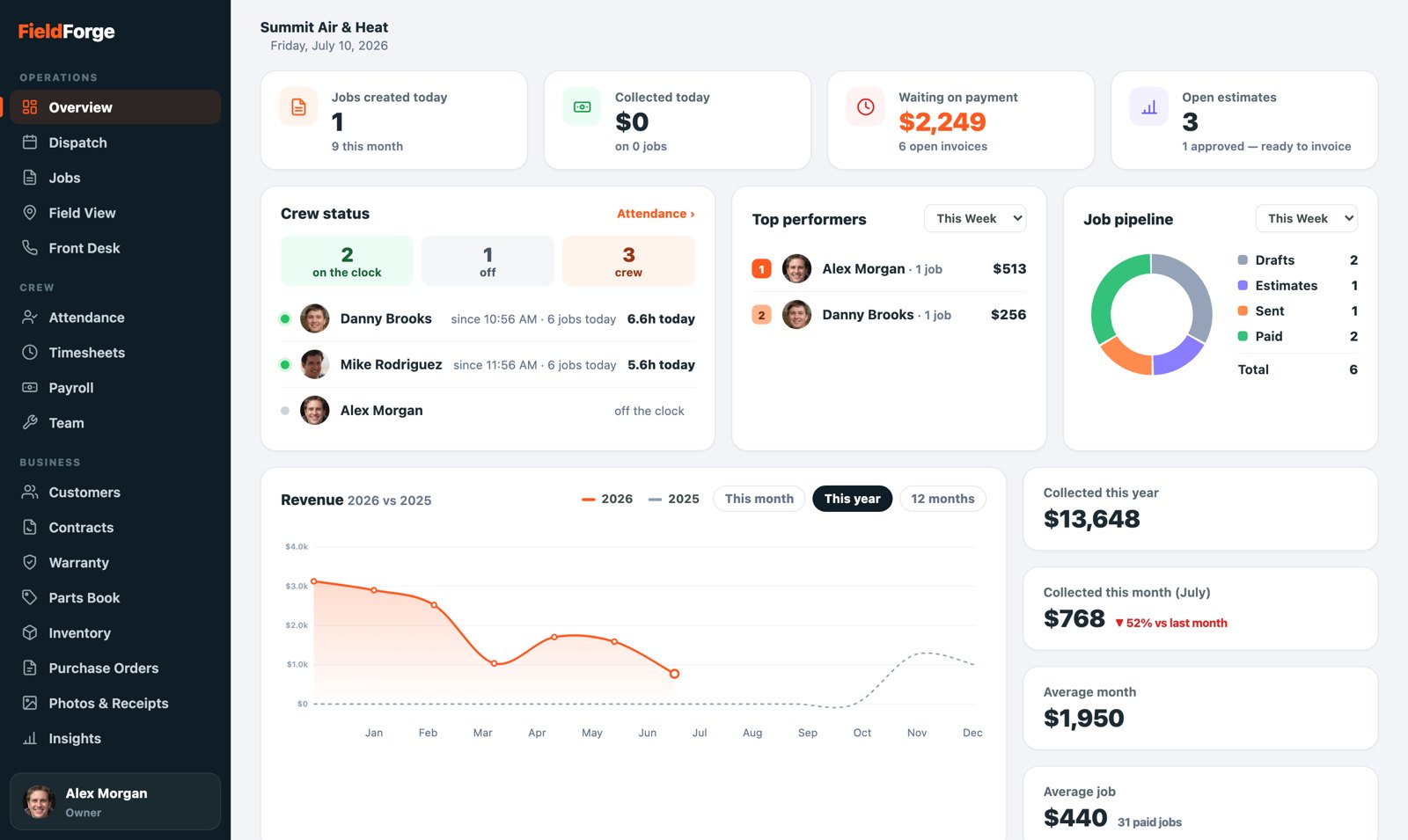
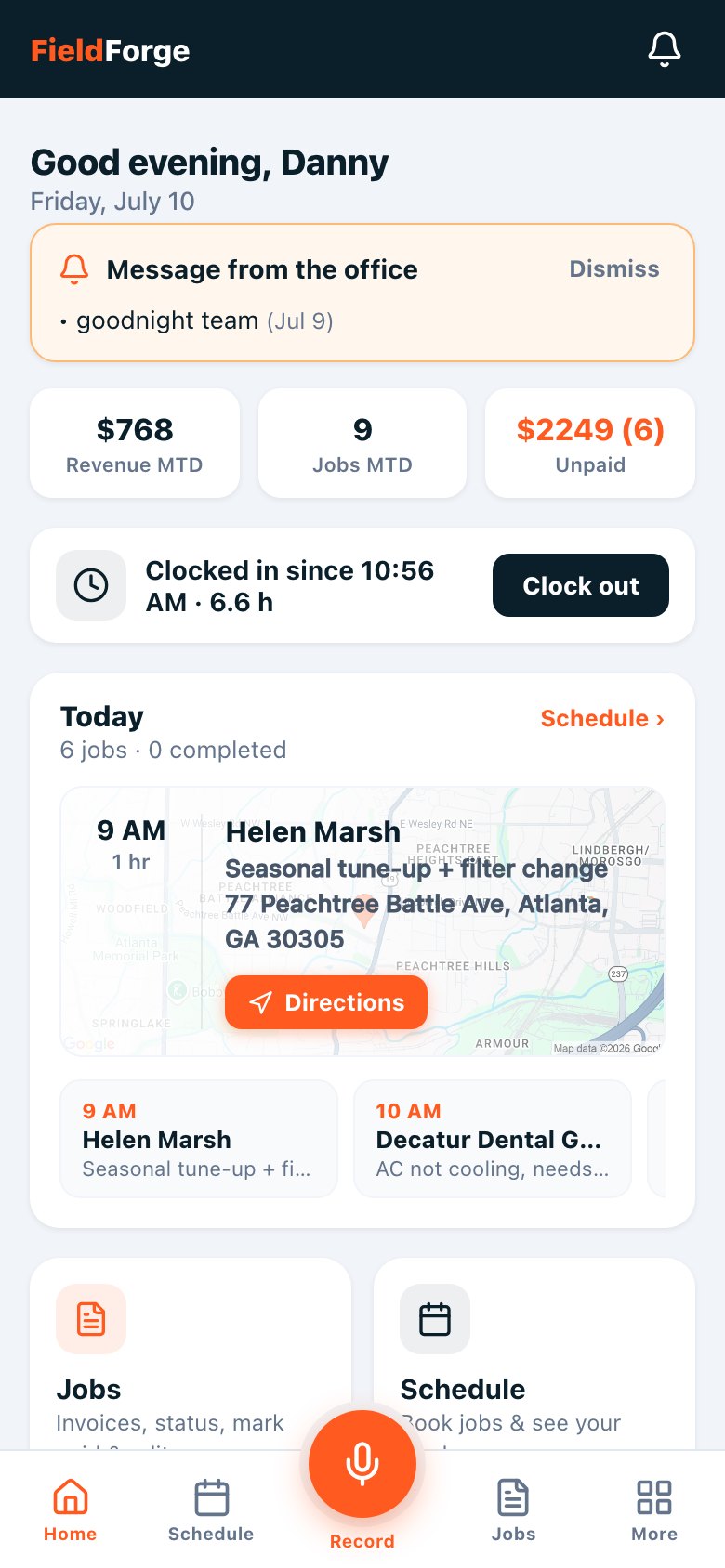
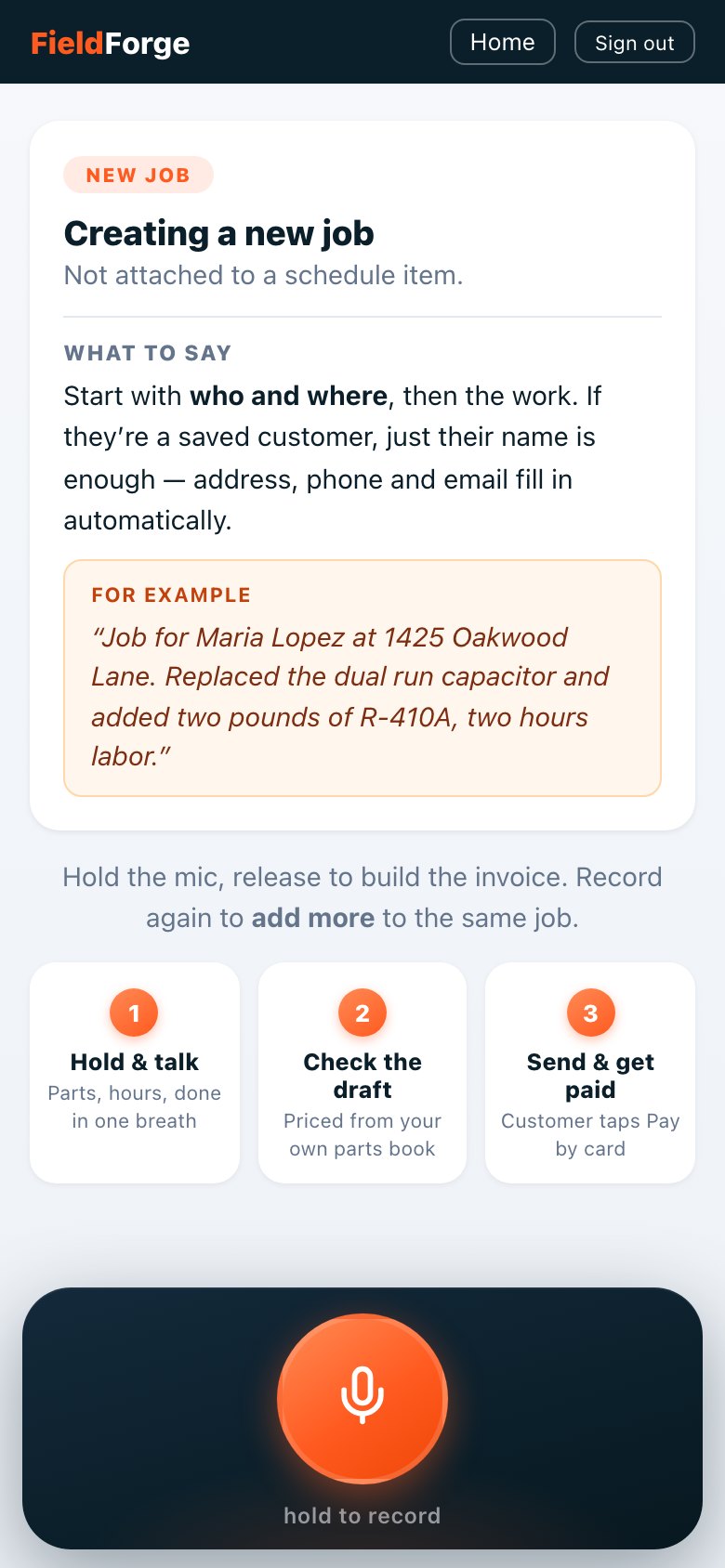
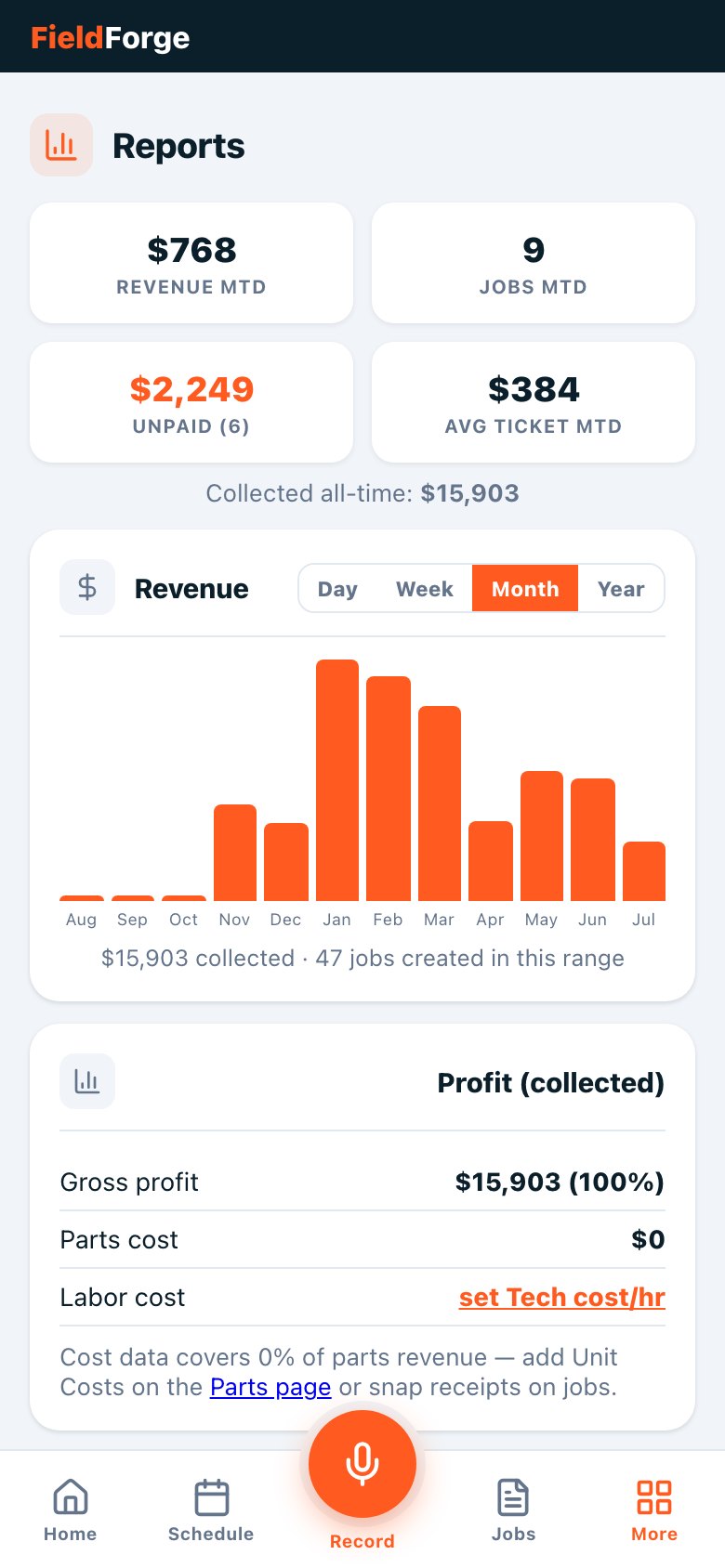
No marketing fog: what each feature does, how the flow actually works, and which plan it lives on. Screenshots of the Command Center and mobile app are the real product, taken this week.
One login. Two surfaces. Everything talks to everything.
All plans
Command Center (web console)
The owner's desk: a browser console with the whole business on one screen — today's money and jobs, crew status, top performers and the job pipeline. Tabs cover Dispatch, Jobs, Field View, Customers, Contracts, Warranty, Parts, Inventory, Purchase Orders, Photos, Insights, Activity, Audit Log and Settings.
How it works: Open usefieldforge.com/console → everything below is a tab. What the crew does on their phones shows up here in real time; what you change here shows up on their phones.
All plans
Mobile app (installable, works offline)
Every tech's whole day on their phone: clock in, see the schedule with drive times and directions, record jobs by voice, check their pay — and it installs from the browser like a real app, or download it on the App Store. Voice notes recorded with no signal queue and send when coverage returns.
How it works: Tech signs in once with a text (or email) code → installs from the browser or the App Store → runs the day from the Home screen. Notifications from the office appear as the orange banner up top.
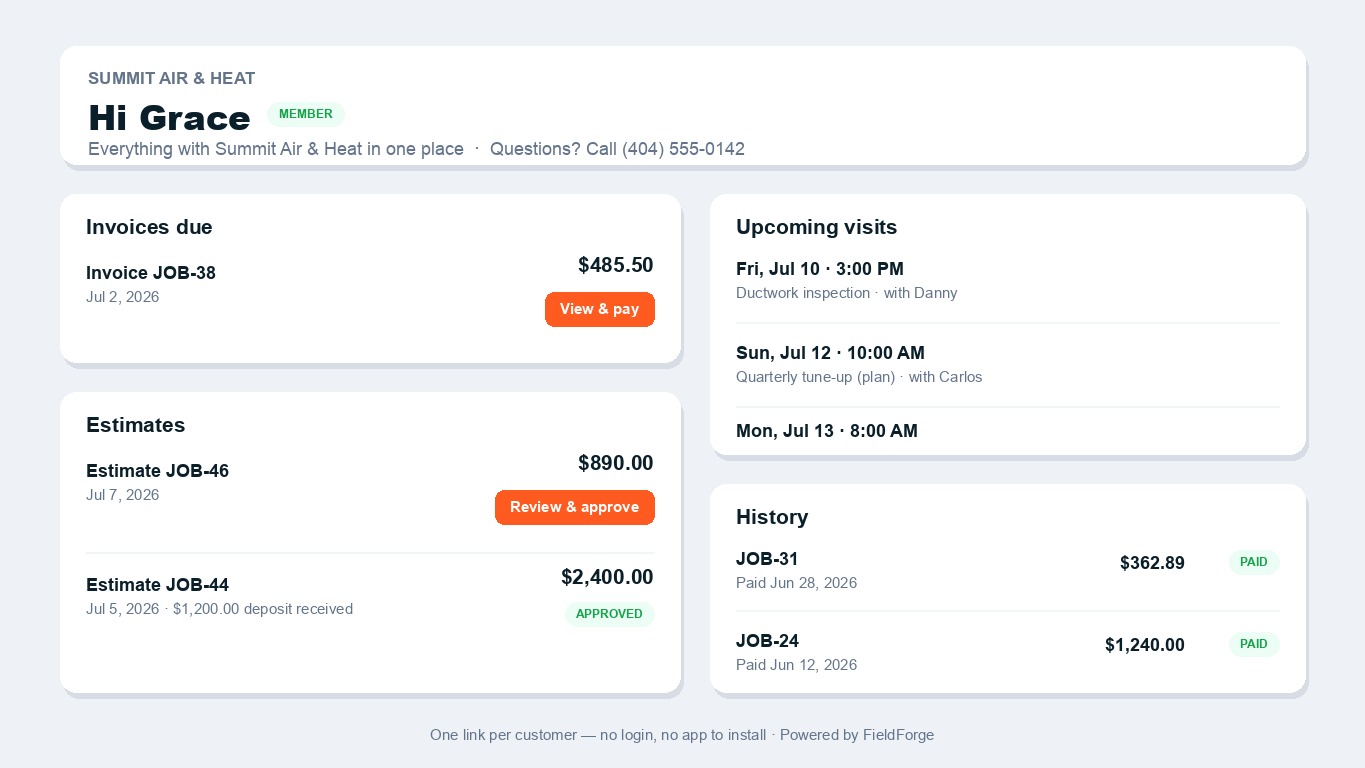
Every customer gets one permanent link with their open invoices (and a Pay button), estimates awaiting approval, upcoming visits with the assigned tech, and full paid history.
How it works: Share it in one tap from the customer's record — it's also offered automatically at the bottom of every invoice. No password, no app to install.
Winning the job
From the first phone ring to a signed yes.
$49/mo add-on
Front Desk — AI receptionist (beta)
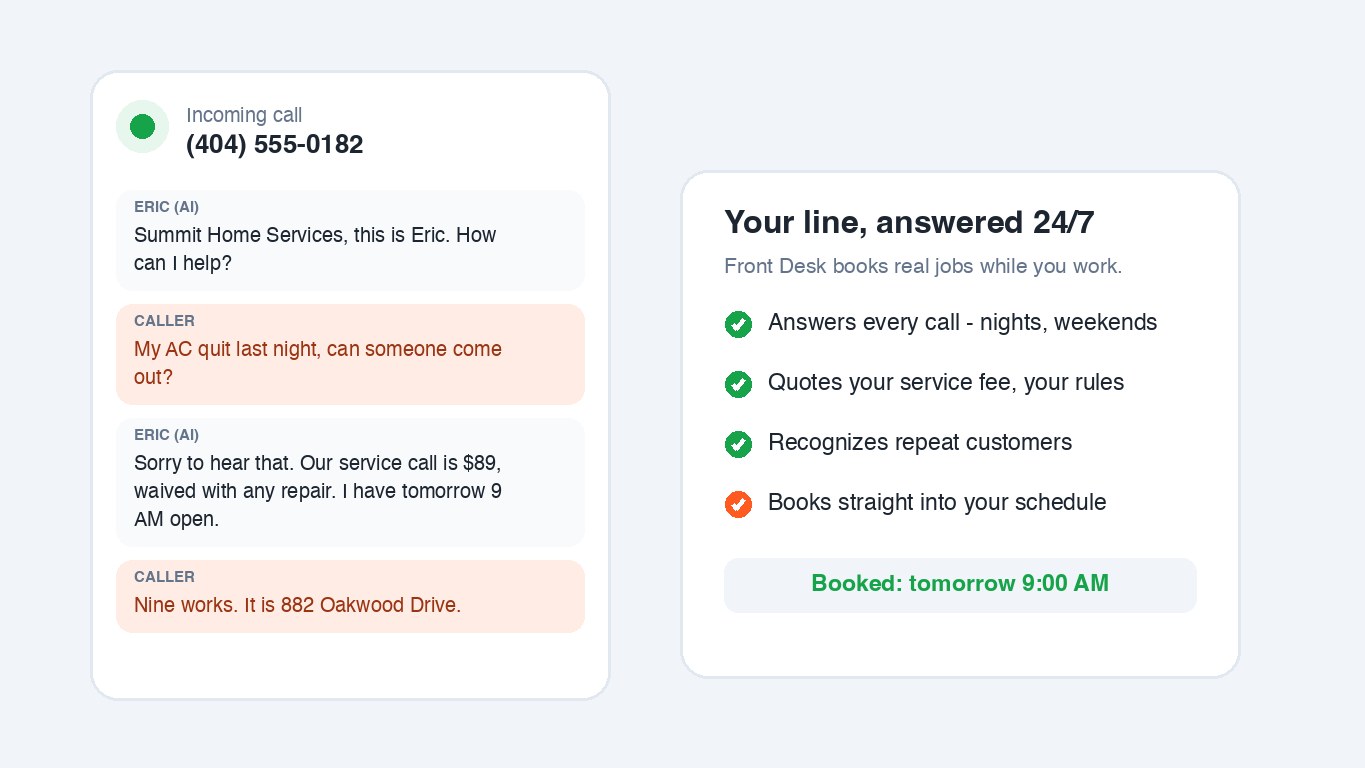
An AI that answers your business line 24/7, quotes your service-call fee by your rules, recognizes repeat customers by their number, and books the visit straight into your schedule.
How it works: Customer calls → Sky answers with your company name → quotes your fee, collects the address and problem → books an open slot → the job appears in Dispatch and the customer gets a confirmation text.
All plans
Customer CRM + sales pipeline
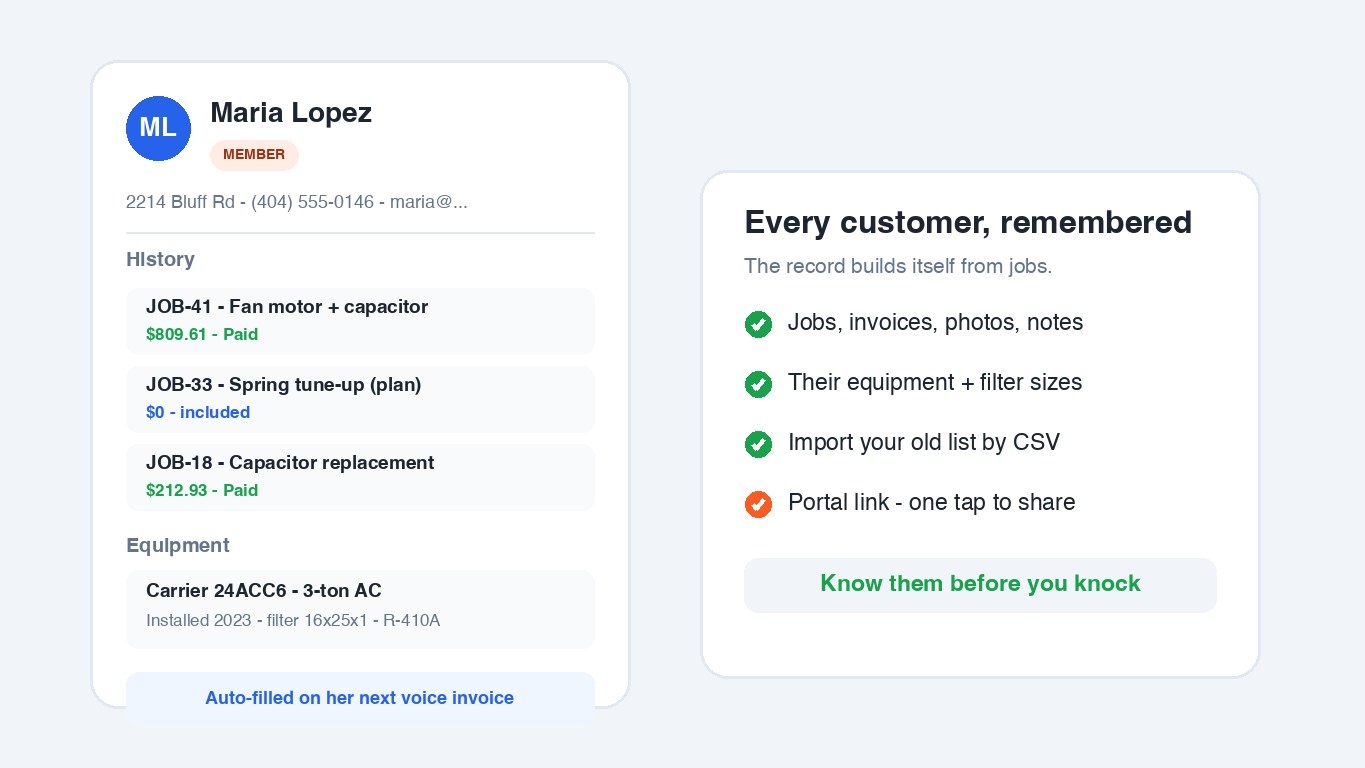
Every customer's jobs, invoices, equipment, photos and notes in one record that builds itself as you work, with lead source, tags and access notes for the office. A drag-and-drop sales pipeline tracks each customer from new lead to Won or Lost, and it advances itself as you schedule visits, send estimates and get paid, so the board stays current without anyone updating it. Members are badged everywhere, and one click scans your list for duplicate records. Switching from another platform? Import your whole customer list from any CSV export in about a minute; duplicates are skipped automatically.
How it works: Customers → Pipeline to see the board, or Import CSV → map the columns (it guesses for you) → done. On the next voice invoice, saying a saved customer's name auto-fills their address, phone and email, and their pipeline card moves itself as the job progresses.
All plans
Flat-rate price book import
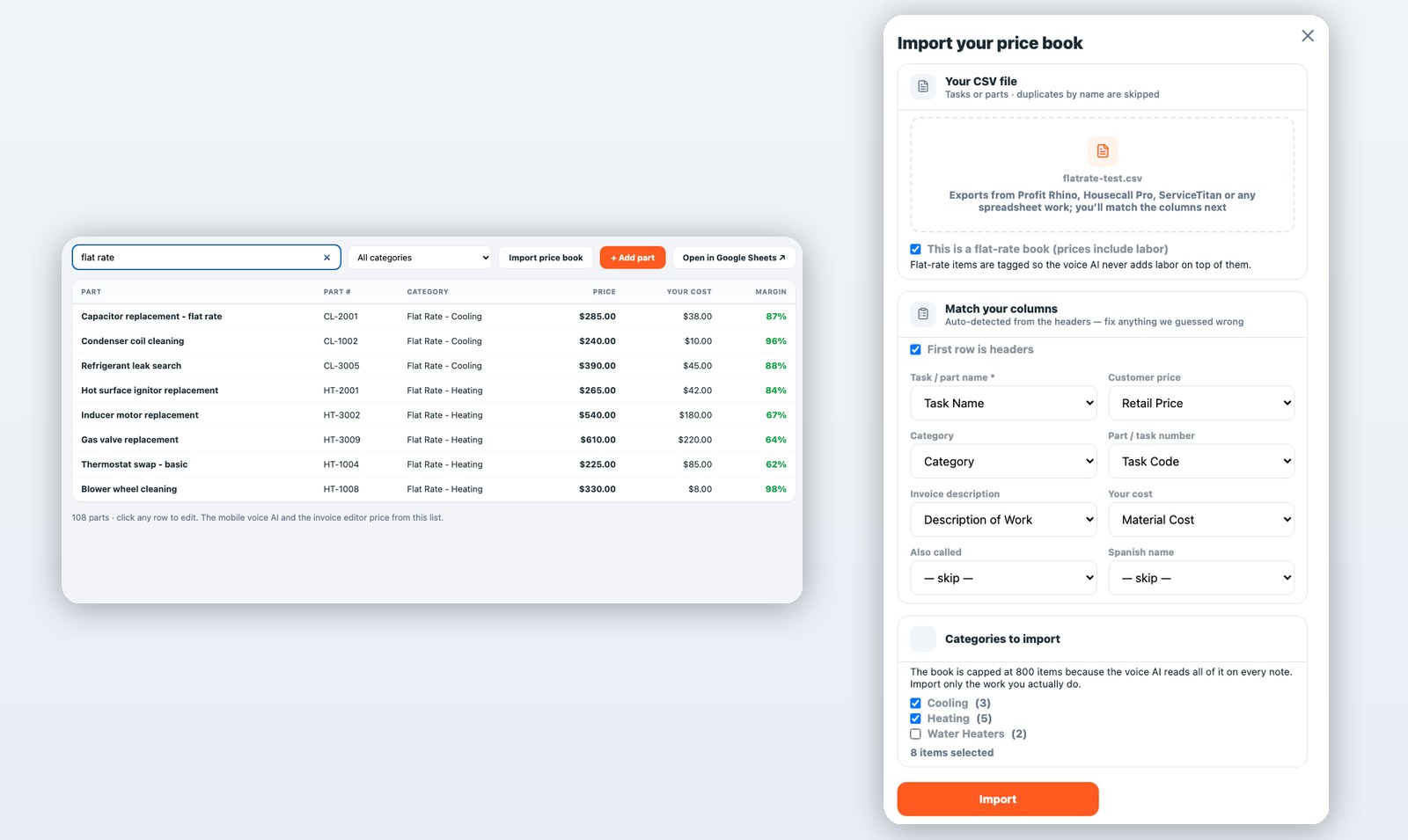
Your price book is years of hard-won pricing knowledge. Bring it with you: upload the CSV from Profit Rhino, ServiceTitan, Housecall Pro or your own spreadsheet, match the columns (it guesses for you), and pick just the categories you actually work. Mark it as a flat-rate book and every task is tagged all-inclusive, so the voice AI bills the listed price and never stacks labor on top. Duplicates are skipped; the book caps at 800 items so voice pricing stays sharp.
How it works: Parts Book → Import price book → map columns → pick categories → Import. Speak "flat rate capacitor replacement" on the next job and the task prices itself.
All plans
Estimates & signature approvals
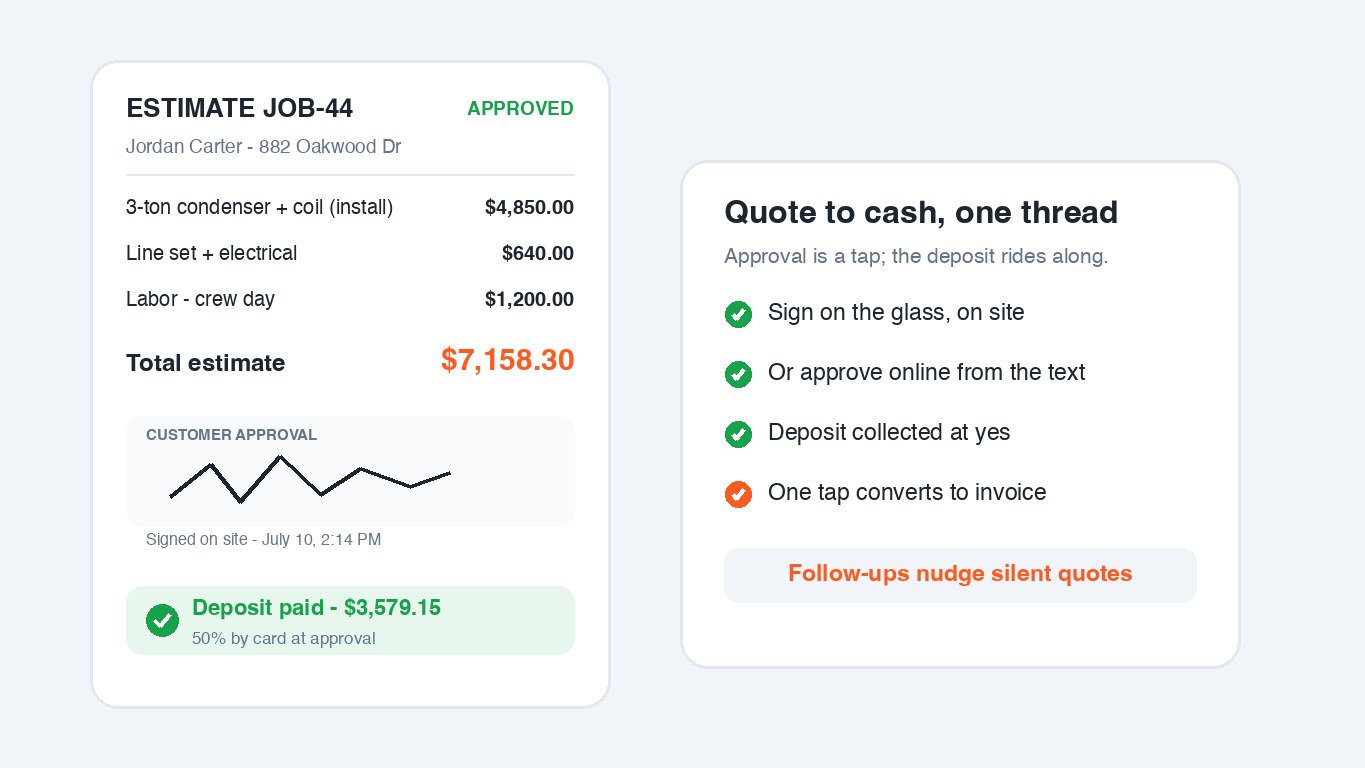
Speak an estimate the same way you speak an invoice. The customer approves on the glass in person, or online from a text, and can sign to approve right on their own phone, not just on-site. One tap converts the approved estimate into an invoice for the balance.
How it works: Say the job → estimate texts to the customer → they tap Approve (and sign, in person or online) → status flips to Approved and you're notified → CONFIRM converts it to an invoice.
All plans
Good / Better / Best options
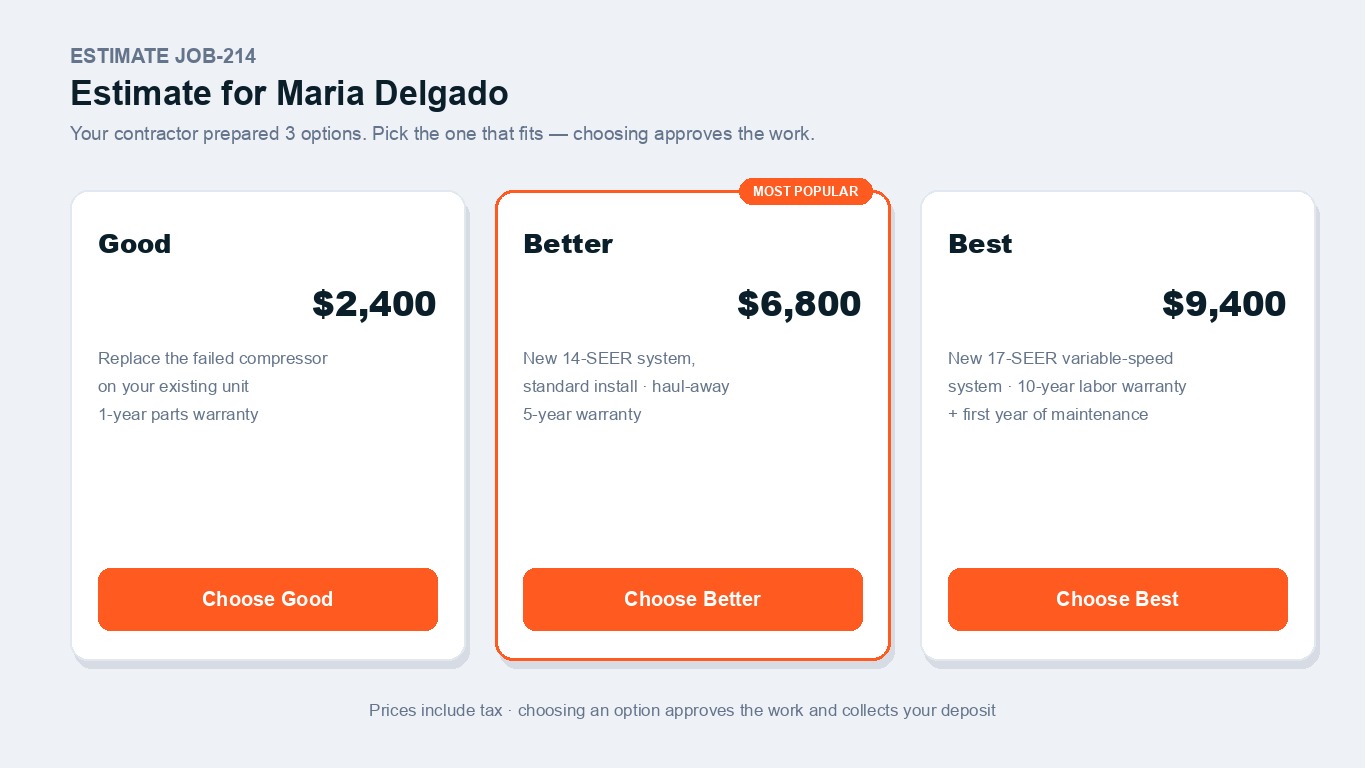
Put two or three packages on one estimate. The customer taps the tier they want — the tap is the approval, and the estimate rewrites itself to the chosen package, tax-exact.
How it works: Open the estimate in the editor → add option tiers with a label, price and description → send. The customer's choice locks the options and triggers the deposit on the price they picked.
Trio+
Change orders
Scope grew mid-job? Add the extra work as a change order and text the customer an add-on to approve online, with a signature if you want one, instead of arguing about the bill later. Once they approve, merge it into the invoice in one tap and the total updates. You keep a clean, approved record of exactly what was authorized.
How it works: Open the job in the Command Center → Change orders → + New change order → add the extra items → send. Customer approves (and signs) online → tap Merge in → the invoice and total update, with the approval on file.
Sign-off that the work is done
All plans
Capture the customer's signature that the job is complete: in person on the tech's phone, or online from the customer's own phone right on the invoice link. One Settings switch turns the online sign-off on. The signature shows on the invoice and the customer portal, so you keep clean, dated proof the work was approved.
Multiple locations per customer
Trio+
Property managers, chains and repeat commercial accounts rarely live at one address. Give a customer as many labeled locations as they have (Building A, the warehouse, unit 4), then pick which one when you book a visit, write an estimate or log a unit. Equipment, jobs and history all know which location they belong to, so you can filter a customer's job history by site. Locations can be shared across customers, so a management company and its tenant accounts point at the same building.
Own your data, export anytime
All plans
Your customers, invoices, estimates, line items and price book are yours. Any owner can download the whole account as a single ZIP of clean CSV files, ready for Excel or Google Sheets, in one tap from Settings. No lock-in, and cancelling never deletes a thing.
Import your job history
All plans
Switching from another platform? Bring your past invoices and estimates with you. Upload a CSV from Jobber, Housecall Pro, ServiceTitan or a spreadsheet, match the columns once, and your history lands as closed records you can search and report on. Imported records are historical only: never sent, charged, or reminded, and duplicates are skipped by invoice number.
Photos your customer sees
All plans
The job photos your crew snaps show up on the estimate approval page, the invoice and the customer’s portal. The cracked heat exchanger photo does the selling for you, and the after shot heads off disputes. Receipts stay private, and one Settings switch turns customer photos off entirely.
Estimate deposits
All plans (needs card payments)
When a customer approves an estimate online, they're asked to pay a deposit by card on the spot (you pick 25–75%). The tech on the job gets a heads-up when it lands, and the final invoice automatically charges only the balance.
Automatic estimate follow-ups
Solo Pro+
Quotes that go quiet get a polite nudge automatically — first after a couple of days, an optional second one later, in your own words. One thread, never spammy, stops the moment they approve or you convert the estimate.
Online booking requests
All plans
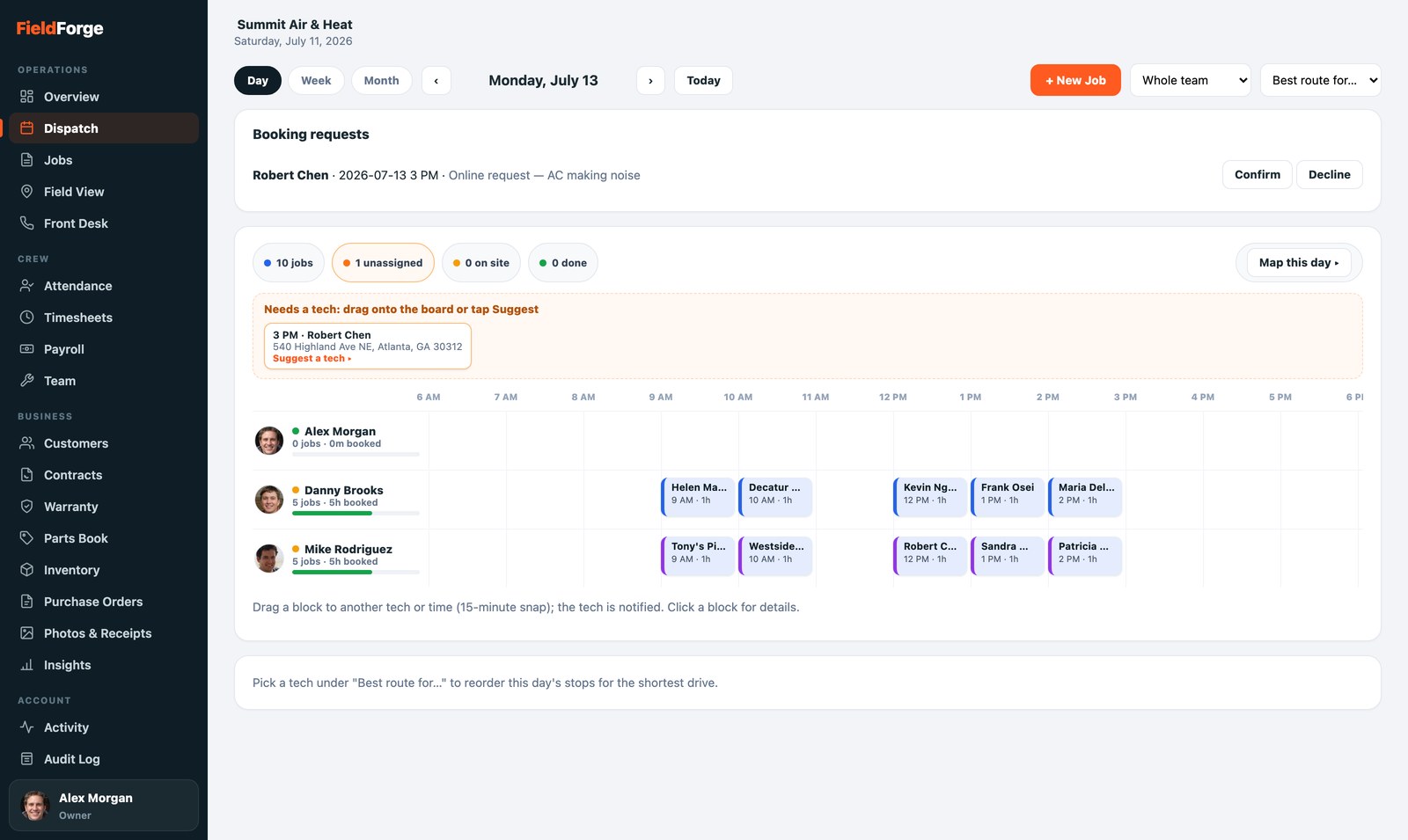
Customers can request a visit from your website; requests land in Dispatch where you confirm them onto a tech's day with ranked recommendations for who fits best.
Thumbtack lead import
All plans
Paste one URL into your own Thumbtack account and new leads land straight in Dispatch as a request to confirm, name/phone/job details already filled in. No partner approval, no copy-paste, and you get texted the moment a lead comes in: Thumbtack ranks pros partly by how fast they respond.
Angi lead import
All plans
Your Angi leads drop into the same Dispatch board, with the customer's email included (Angi sends it, Thumbtack doesn't), and you get texted right away. Angi connects it on their end: you send us the webhook URL from Settings and email it with your Angi ID to their team, then leads flow in automatically.
Free company website
All plans
Every company gets a one-page website built automatically from data already in FieldForge: your services from the price book, reviews link, job photos and a Request Service button wired straight to your Dispatch board. Pick your web address in Settings, hit Publish, done. English y Español included.
Estimate templates
Trio+
Build a proposal template once (your intro, scope of work, equipment photos, terms) for each big job you quote: system replacement, water heater, panel upgrade. Templates can carry your standard line items, labor hours and good/better/best tiers too, so a tech can tap + New estimate, pick the template and a customer, and send a fully priced proposal in under a minute, no voice note needed. The customer opens a page that reads like your best salesman wrote it, with the approve button right there.
Doing the work
The day runs itself so the crew can turn wrenches.
All plans
Voice invoicing — the core of FieldForge
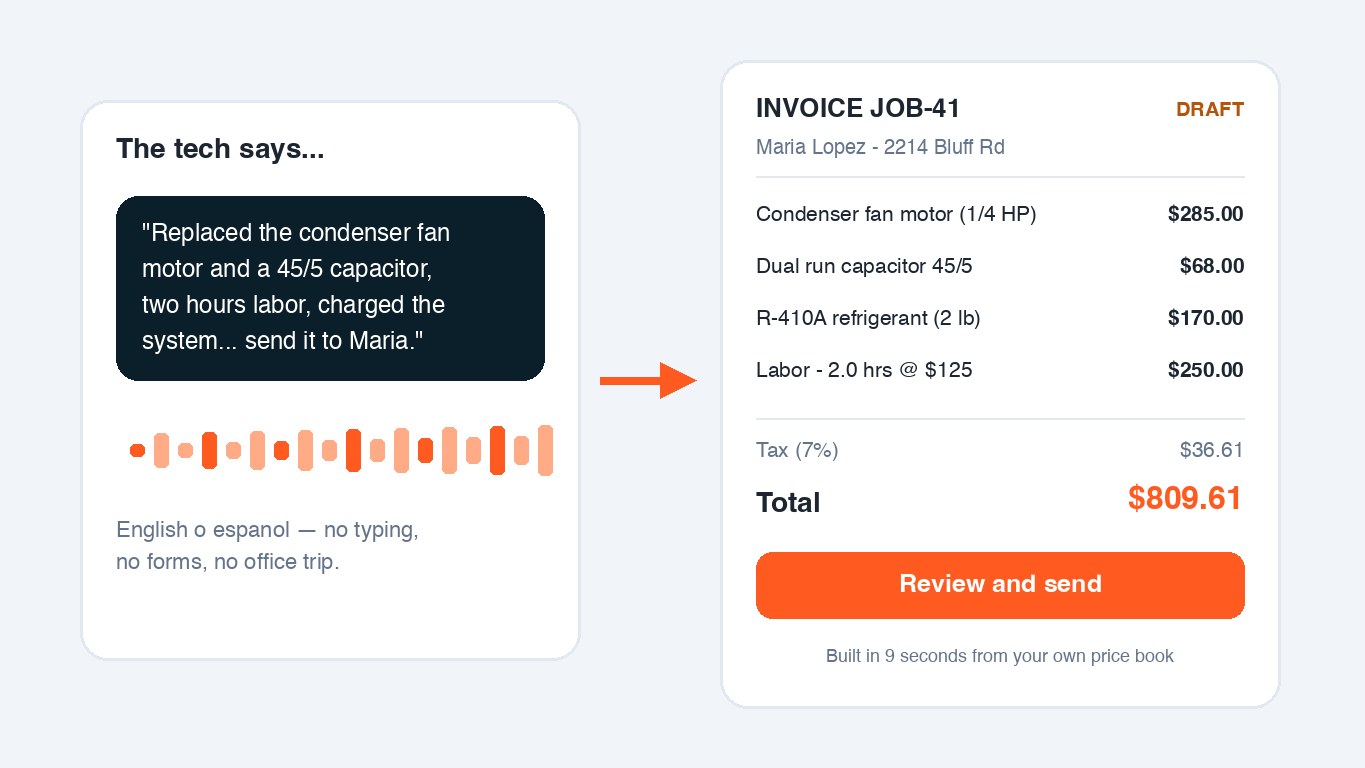
Describe the job out loud, in English or Spanish, exactly like you'd tell a coworker. The AI matches parts against your own price book (including nicknames like “45 5”), prices the labor at your rate, applies your tax rule, and builds a clean draft invoice in seconds.
How it works: Hold the mic → talk → release. Review the draft (edit anything in the web editor) → CONFIRM → PDF generated and texted/emailed to the customer with a payment link. Nothing sends until you say so.
All plans (routes Crew+)
Scheduling, dispatch & route optimization
The Dispatch board shows every tech as a row on a timeline: photo, live GPS dot, and a capacity bar that fills as their day books up. Drag a job block to any tech or time (a ghost slot previews exactly where it lands); double-bookings ring red; unassigned work waits in its own lane with ranked "Suggest a tech" picks. Route optimization reorders the day's stops for the shortest drive.
How it works: New job → pick the customer (details prefill) → drop it on a tech's row. The tech is notified with the date whatever day it's for; same-day jobs also go out by text. Moving a job to another tech keeps the customer's appointment time, and a real time change asks you first.
All plans
On My Way texts with live tracking
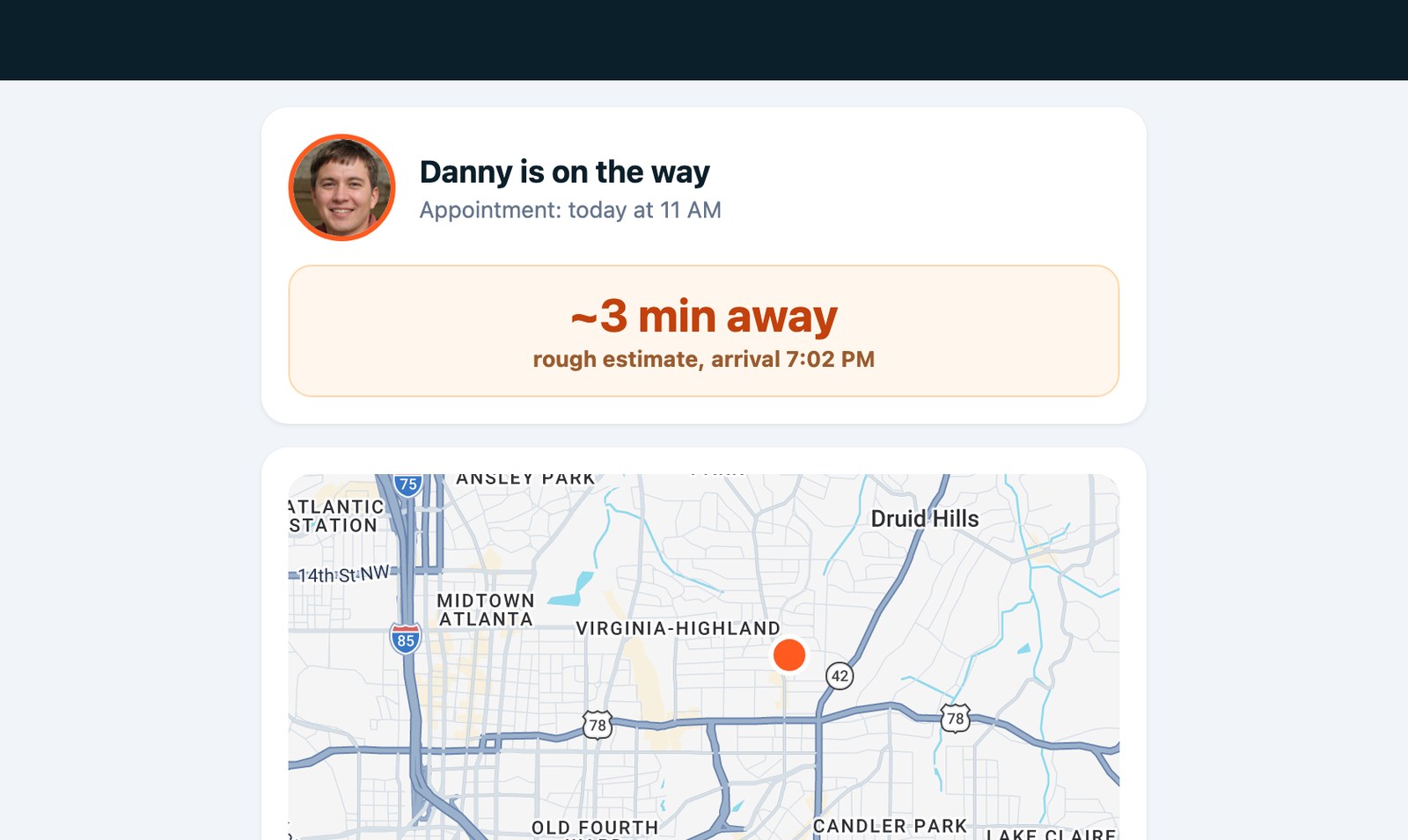
When the tech rolls, one tap texts the customer a link to a live page: the tech's photo, a map of where they are, and an arrival countdown. The booking flips to En route on your dispatch board at the same moment, and the page shuts off automatically when the tech checks in on site.
How it works: Tech opens today's job → taps On my way → customer gets the text and watches the countdown. Each link works for that one visit only, and location sharing ends at arrival.
Crew+
Field View: live crew & job map
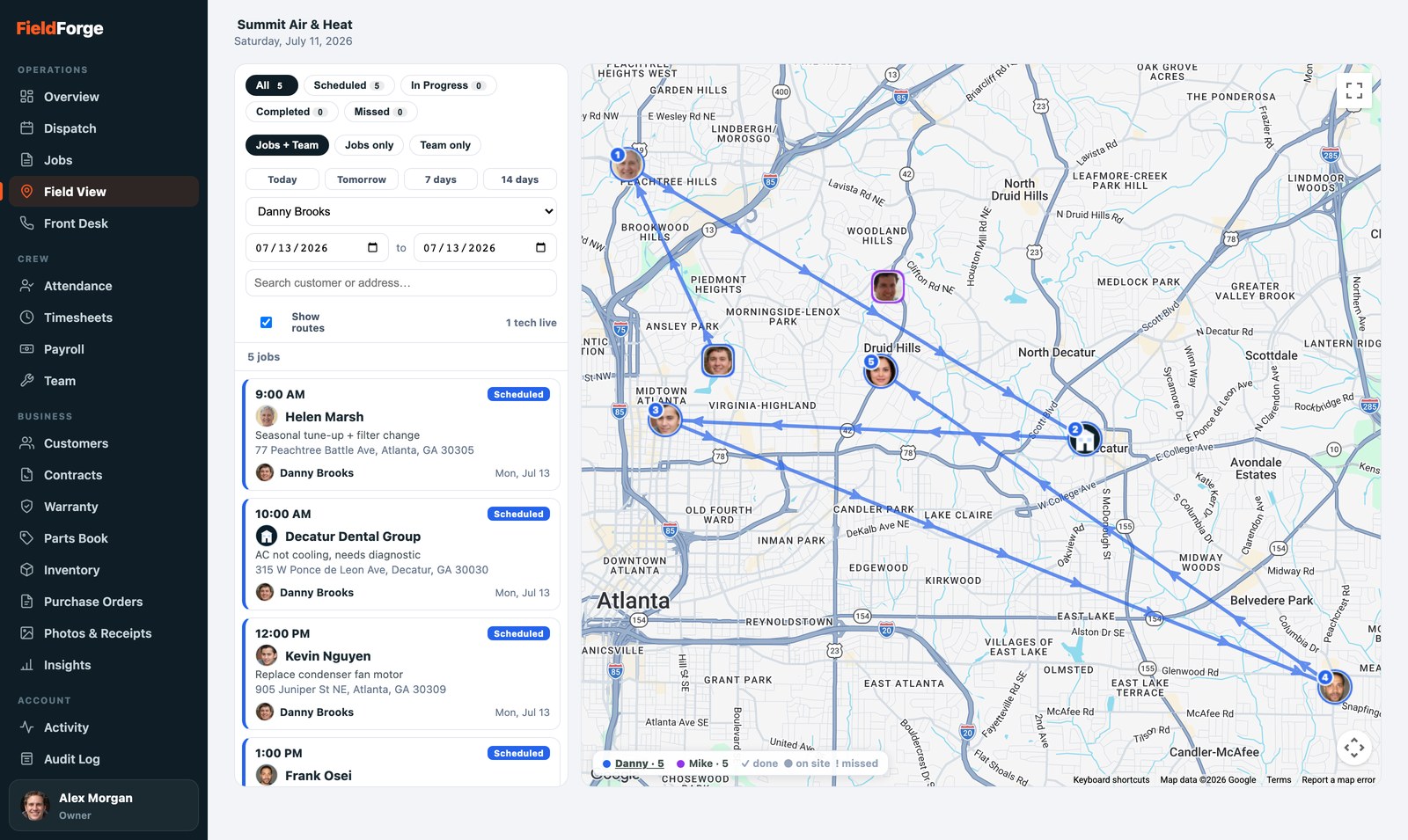
A real map of the whole day: every job pinned with the customer's face in the assigned tech's color and numbered in visit order, every truck's live position (refreshed every 30 seconds), and a click-a-name legend that traces one tech's route at a time. Done jobs get a green check, missed ones a red mark.
How it works: Phones ping location while techs are on the clock; nothing to set up. Click any job pin for ranked "who's closest and free" reassignment, or click a tech for their whole day and GPS trail. "Who's closest to this emergency call?" becomes one glance.
All plans
Job & equipment photos + receipts
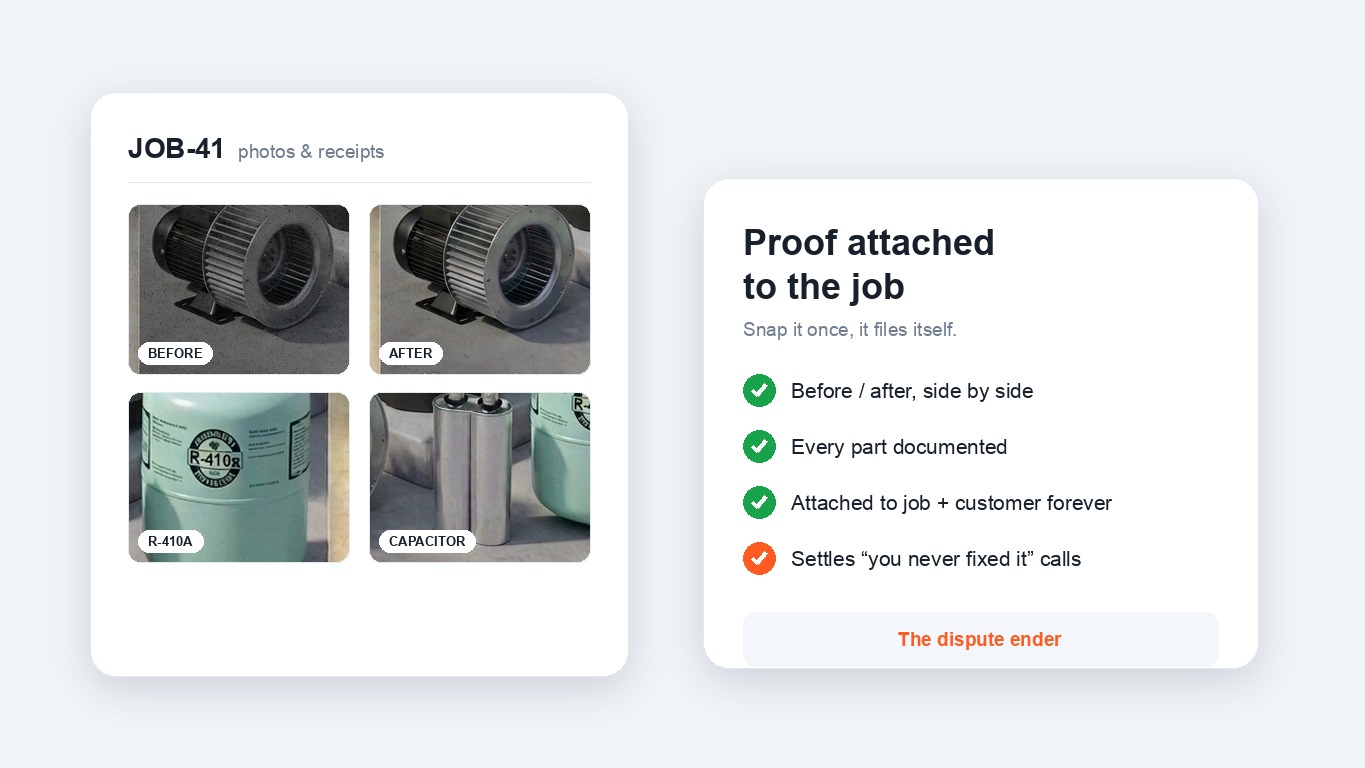
Snap before/after photos and material receipts from the truck; they attach to the job and the customer's record permanently. When the “you never fixed it” call comes six months later, the photos end the conversation.
How it works: Job → camera icon → shoot. Photos ride along to the console's Photos & Receipts tab, organized by job and customer.
Solo Pro+
Equipment & warranty tracking
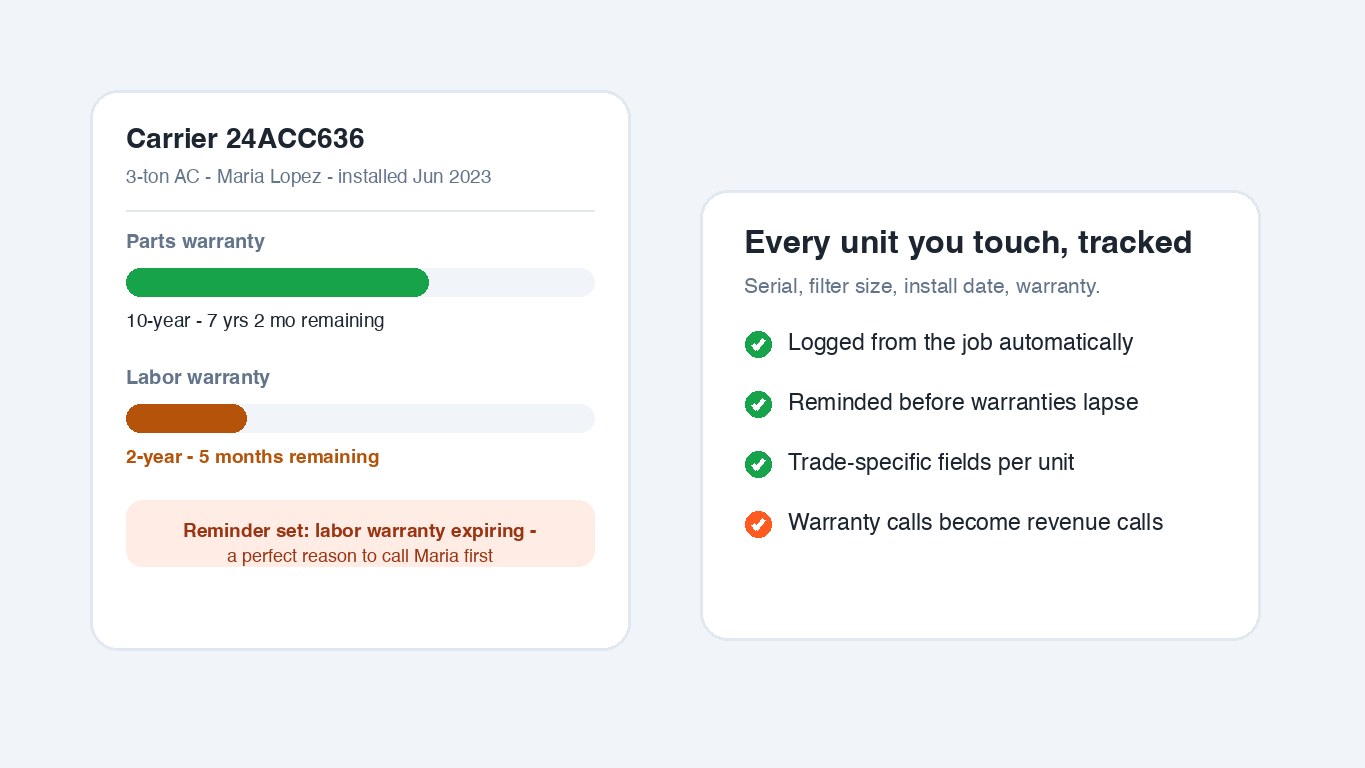
Every unit you touch gets logged with trade-specific fields (model, serial, filter size, refrigerant, panel amperage — you can customize the fields per trade). Warranty clocks tick per unit and remind you before they lapse.
How it works: Equipment is captured from the job (or added in seconds) → FieldForge reminds you before warranties and maintenance come due — a built-in reason to call the customer first.
Type it in, no voice needed
All plans
Prefer to type? Create an invoice or estimate by hand from the Jobs screen: add the line items, pricing and customer in the editor, then send. Voice is the fast path, not the only path, and it works the same on every plan and every trade. Started one by mistake? Discard a draft in a tap.
Day-before appointment reminders
Solo Pro+
The evening before a scheduled visit, the customer gets a text reminder with the time and your phone number — in your words if you want. One per booking, never for cancelled or done visits. Cuts no-shows.
Multi-tech crews on one booking
All plans
Two-man water heater swap? Assign a lead tech plus up to five crew members to the same visit. It shows on everyone's schedule with a crew badge, all of them get the assignment notification, the dispatch board counts it against each tech's capacity, and any crew member can fill the job checklist. One booking, no duplicates to keep in sync.
Job forms & checklists
Trio+
Build a tune-up, install QA, or safety checklist once in Settings and every matching visit grows a Checklist card on the tech’s phone: checkboxes, yes/no questions, short answers. Mark it required and the visit can’t be marked Done until every item is answered; the office sees every answer on the booking.
Custom job stages
Trio+
Define your own workflow stages a job moves through, like Needs parts, Awaiting approval, Ready, In progress, Complete. Set a job's stage from the field or the office, and drag jobs between your stages on a Dispatch board. Mark a stage "requires checklist" and a job cannot enter it until its visit checklist is done. It runs alongside the schedule status, it does not replace it.
Bilingual voice — English y español
All plans
The voice pipeline understands both languages natively — a tech can describe the job in Spanish and the customer still gets a clean English invoice priced from your book.
Getting paid
The gap between “job done” and “money in the bank,” closed.
All plans · 1% platform fee
Card payments on every invoice
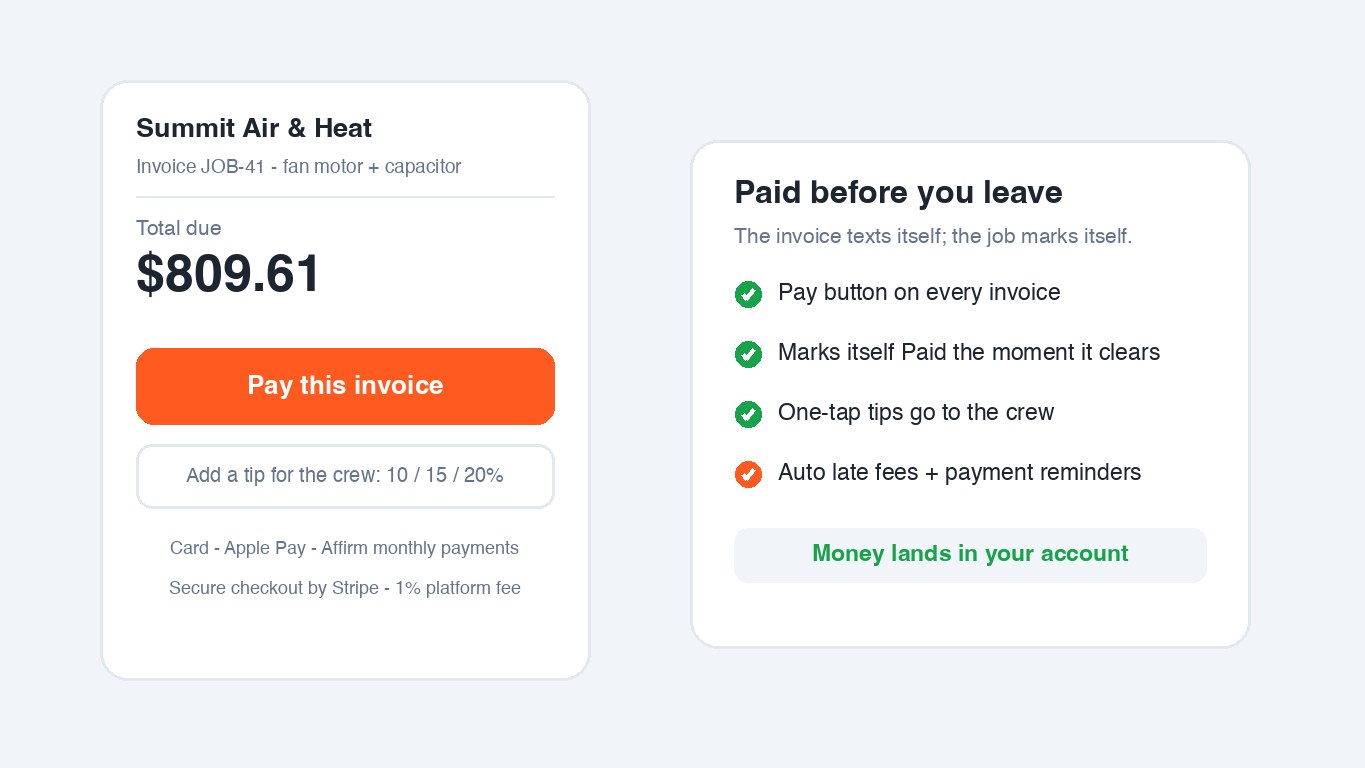
Every invoice carries a Pay button backed by Stripe. The customer pays by card or Apple Pay, the job marks itself Paid, and the money lands in your own Stripe account — you onboard once with a 2-minute Connect signup.
How it works: CONFIRM the job → invoice texts with a short pay link → customer taps, pays → status flips to Paid, the tech is notified, and your books stay right.
All plans (needs card payments)
Customer financing — monthly payments (Affirm)
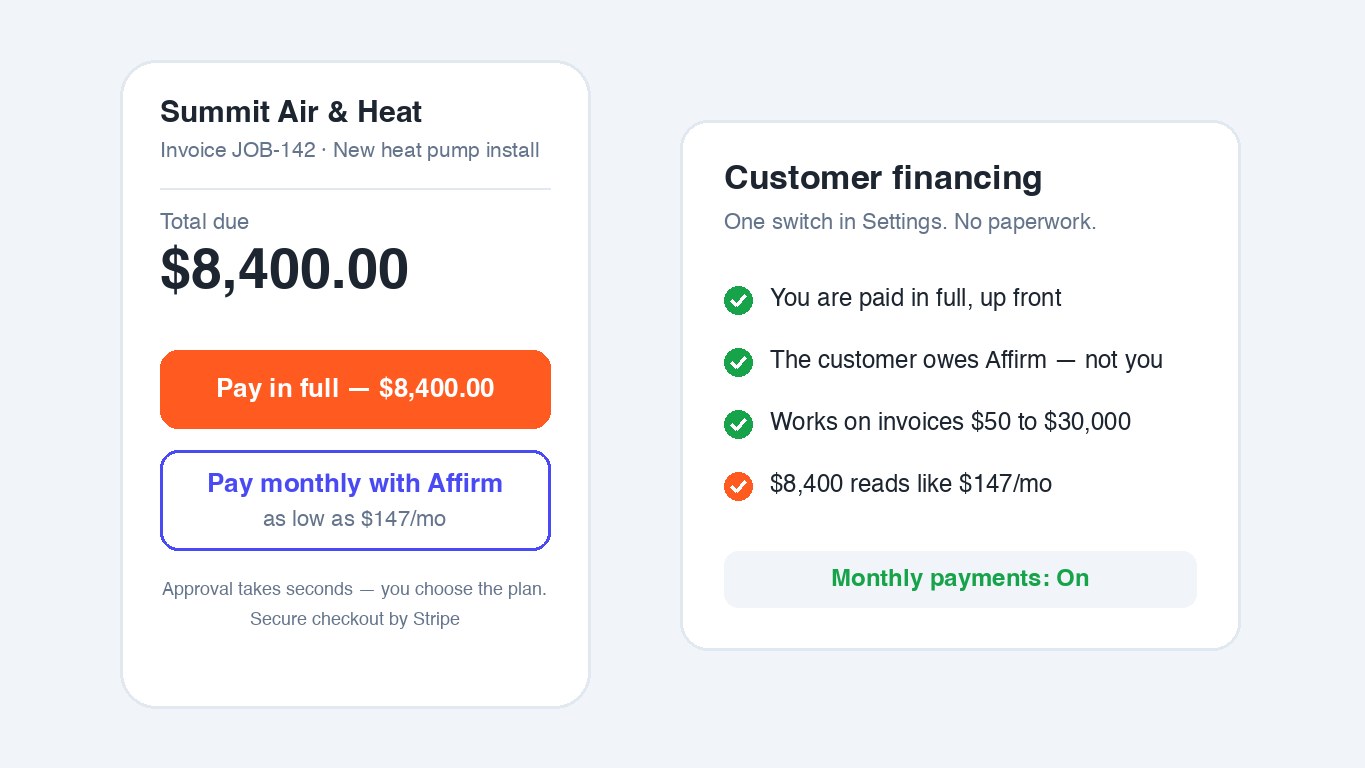
One switch in Settings and card checkout also offers Affirm monthly payments on jobs from $50 to $30,000. You're paid in full up front; the customer owes Affirm, not you. An $8,400 install reads like $147/mo.
How it works: Settings → Payments & Money → Customer Financing → On. Customers who don't qualify simply pay by card — nothing breaks.
Sync all plans · export Crew+
QuickBooks & Xero sync + CSV export
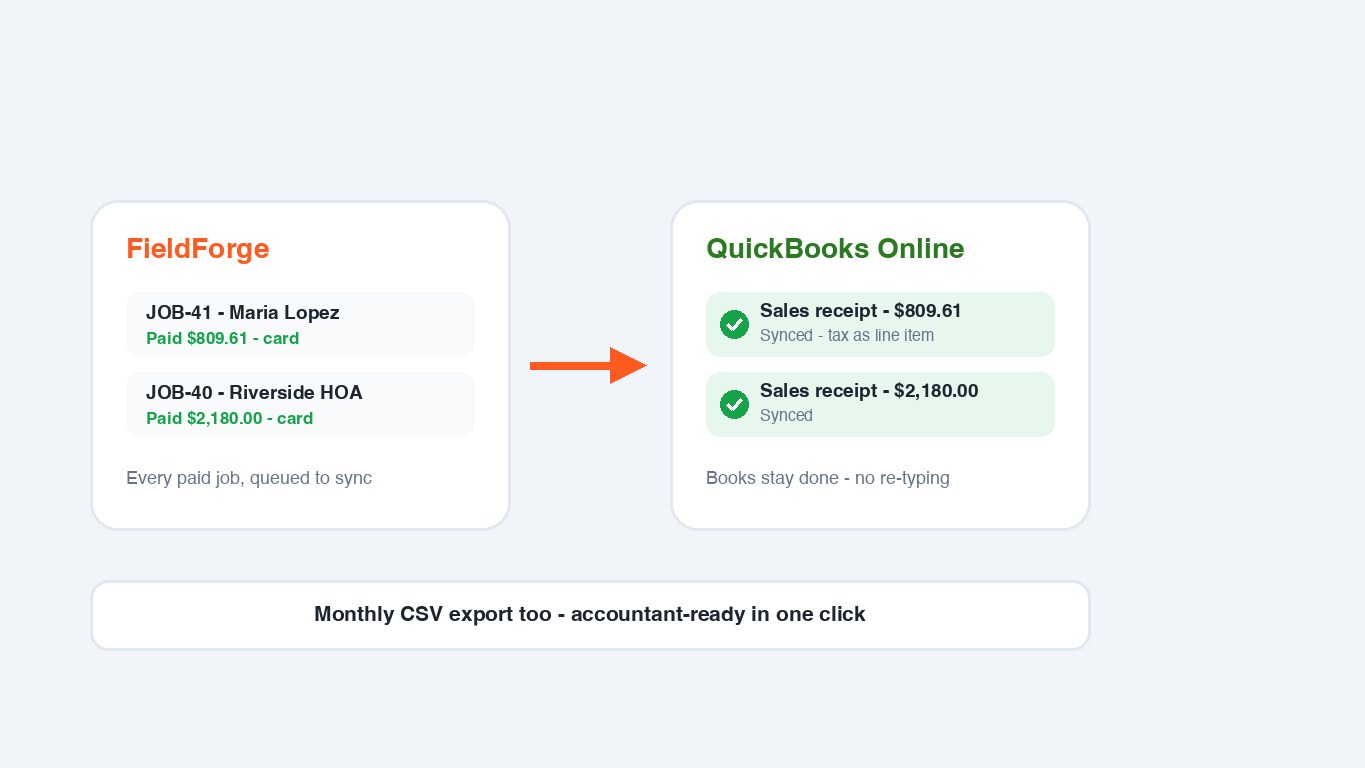
Paid jobs flow into QuickBooks Online or Xero as sales invoices automatically — no re-typing, no per-sync fees. Prefer spreadsheets? A one-click monthly CSV export is accountant-ready.
How it works: Connect QuickBooks or Xero once in Settings → every paid job syncs itself. Sales tax rides as a line item.
Progress invoicing
Trio+
Split a big install into payment stages right from the job screen on the phone, or in the Command Center (50% to start, the rest at rough-in and completion, or any split you like). The customer's pay link always charges the next stage, checks and cash are one tap to record, and the invoice marks itself Paid when the last stage lands. Works alongside estimate deposits.
Card fee recovery
All plans (needs card payments)
Stop eating the ~3% card processing fee, the way you choose. Turn on a cash discount and the invoice shows a lower cash or check price beside the card price (a discount is legal in every state), or add a surcharge that applies only when the customer pays by card. Either way it is disclosed on the invoice before they pay, and the customer can always choose the fee-free way. You pick the mode and the percent in Settings.
Bank payments (ACH)
All plans (needs card payments)
On big-ticket invoices, let the customer pay straight from their bank account. A bank transfer carries no card fee, so it becomes the fee-free option: the invoice offers Pay by card or Pay by bank. You set the minimum invoice size in Settings, the money lands in your own Stripe account, and the invoice marks itself Paid on its own once the transfer clears (a few business days).
One-tap tips at checkout
All plans
Before paying, the customer is offered a one-tap 10 / 15 / 20% tip. The full tip goes to you, and the tech on the job gets a heads-up when one lands.
Automatic late fees
Solo Pro+
Invoices past your cutoff (14–60 days) get a one-time fee (up to 10%) added automatically: the total updates, the customer is notified with the new amount, and stale payment links are voided so they always pay the current total.
Payment reminders — customers & you
All plans
Unpaid invoices remind the customer automatically (daily or weekly, your choice) until they pay, and you get a daily owner report of everything outstanding so nothing quietly ages out.
Web invoice & editor
All plans
Every invoice and estimate is also a live web page: the customer sees a clean, branded invoice with the pay button; you can edit any draft in a mobile-friendly editor before it goes out — line items, prices, customer details.
Repeat revenue
The machine that fills the slow months.
Trio+
Maintenance contracts & recurring billing
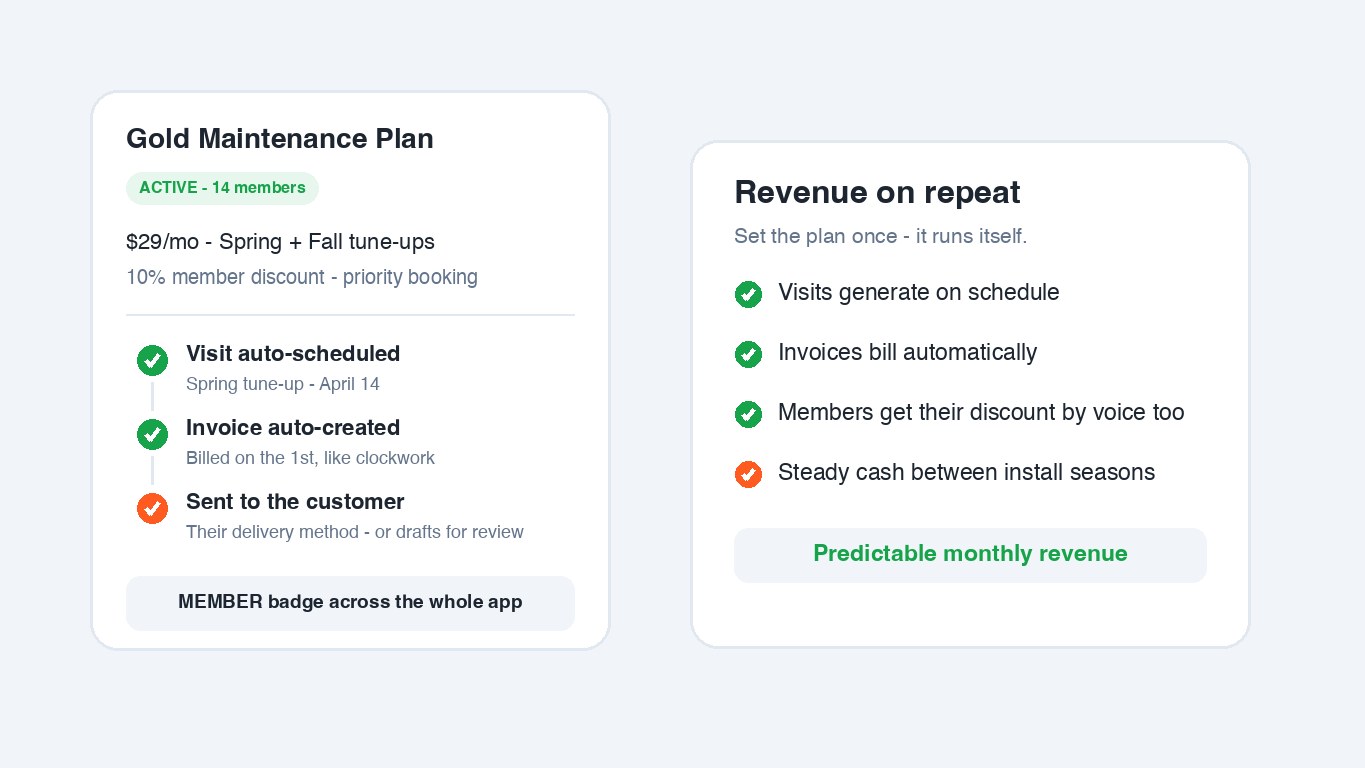
Set up a maintenance plan once (price, billing cycle, visit cadence) and FieldForge generates the visits and the invoices on schedule. Auto-send is your choice: leave recurring invoices as drafts for review, or send them straight to the customer.
How it works: Settings → Maintenance Plans → create a template → attach customers. Visits appear in Dispatch, invoices bill on the cycle (or charge the member's card on file automatically with autopay), and you're notified either way.
Solo Pro+
Review requests on autopilot
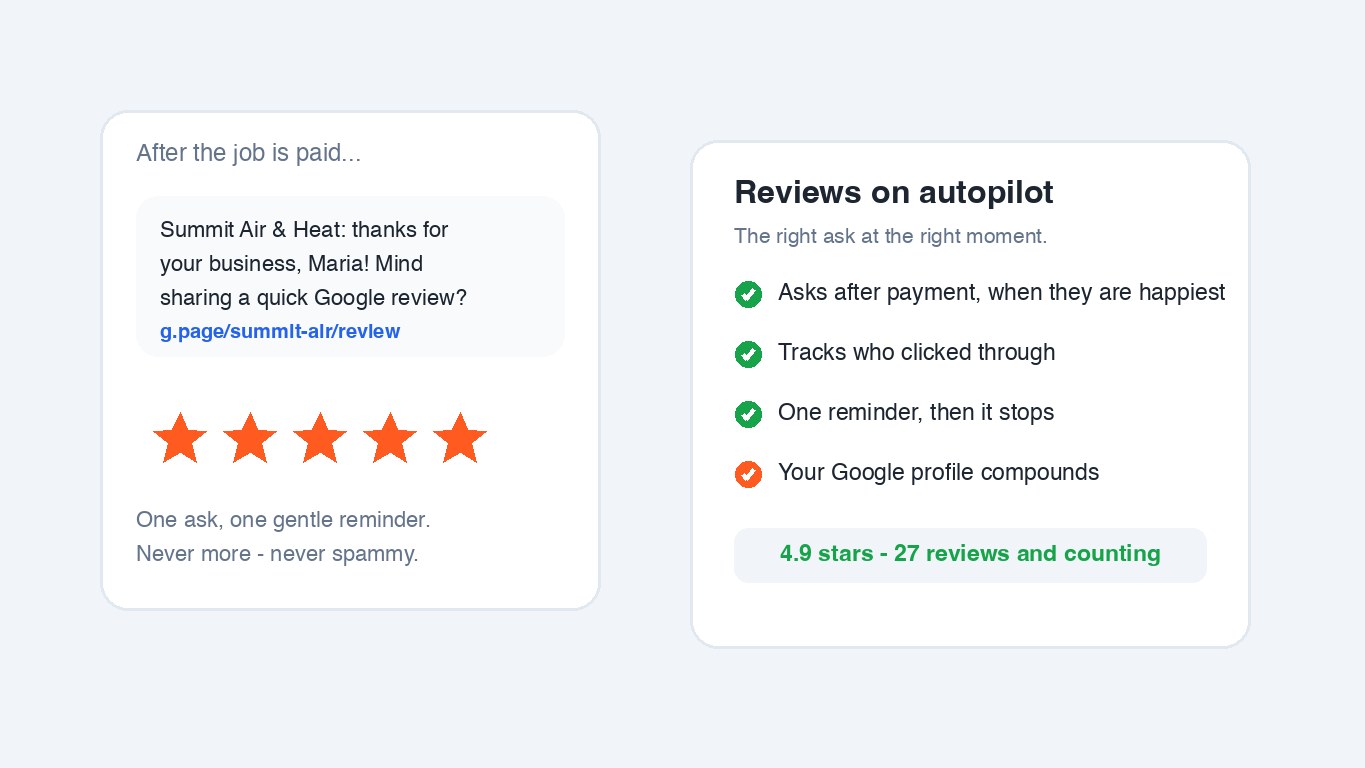
After a job is paid — when the customer is happiest — FieldForge asks for a Google review with your link, tracks who clicked, and sends exactly one gentle reminder. Never more.
How it works: Settings → Customer Reviews → paste your Google review link → on. Watch the stats (asked / clicked) on the same card.
Two-way texting
Solo Pro+
You already text customers a lot: reminders, on-my-way, invoices, review asks. Now their reply doesn't vanish. It lands in a Messages inbox, threaded by customer, on your phone and in the Command Center, with a push the moment it arrives. Reply right there, send and receive photos, and it all runs on your FieldForge number, so your personal cell stays private. If a customer texts STOP, every message to them stops automatically and they show as opted out.
Email campaigns
Trio+
Reach your whole customer base from the Command Center. Describe the offer in a line and AI drafts the subject and message for you to edit. Send to everyone, members, non-members, or a smart segment like customers who haven’t booked in six months, and see who opened and clicked. Every email is branded, personalized with their first name, sends replies to your inbox, and carries a working unsubscribe link. Preview it to yourself first; the one-per-day cap protects your sender reputation.
Drip sequences
Trio+
Set up a series of emails once and let them send themselves, spaced days apart: a welcome the day someone becomes a customer, a check-in a week later, a tune-up reminder next season. Enroll an audience by hand, or turn on "automatically when I add a new customer" and every new contact starts the series on its own. Opt-outs, branding and reply-to are handled for you.
Memberships & member discounts
Trio+
Customers with an active contract are members: voice-created invoices and estimates automatically include their discount (5–25%, your call) as a visible line item, and they're badged MEMBER across the customer list and dispatch so the crew gives them priority.
Membership autopay
Trio+ (needs card payments)
Members save a card once, from their portal or a secure link you text them, and every renewal charges itself, marks itself Paid, and texts them a receipt. The card lives with Stripe (you never see the number); a decline just falls back to a normal invoice with you notified.
Running the crew
Hours, pay and accountability without spreadsheet nights.
All plans
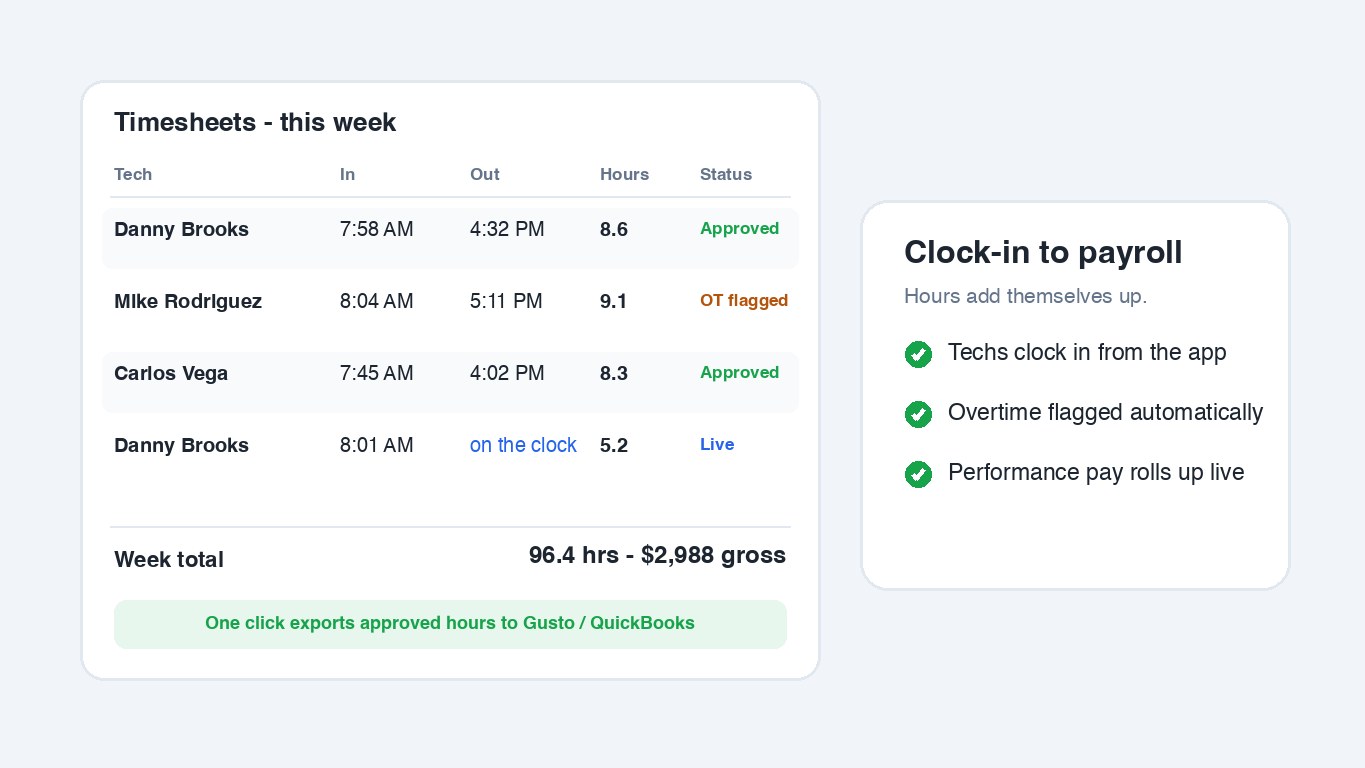
Timesheets, attendance & overtime
Techs clock in and out from the app; hours, attendance and overtime add themselves up with approvals for the owner. One click exports approved hours to Gusto or QuickBooks for payroll. Don't track time? Turn clock-in off in Settings and it disappears from every phone; if you still pay anyone hourly, you just type their hours at payroll.
How it works: Tech taps Clock in on their Home screen → the day accumulates → you review and approve the week in Timesheets. Optional: Settings › Time Tracking to switch it off.
All plans
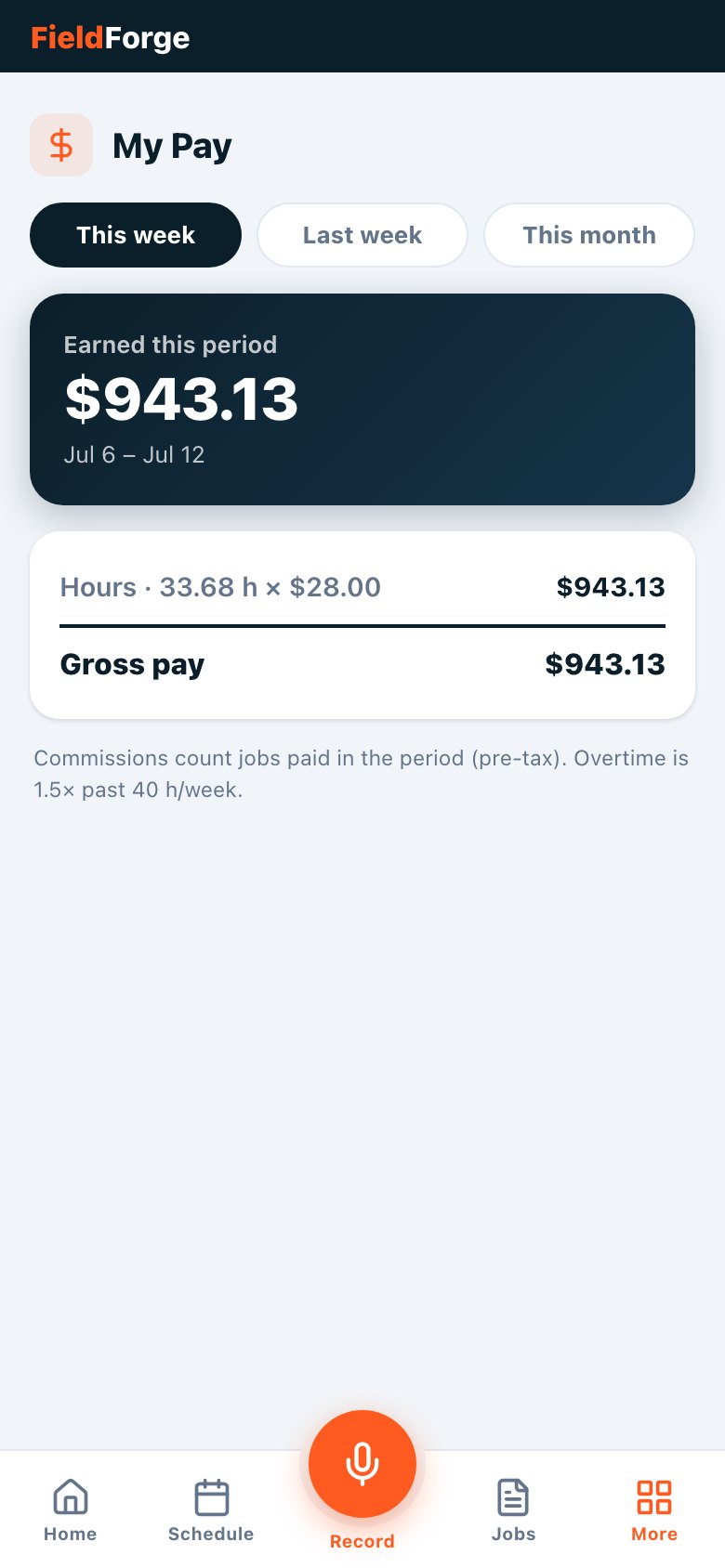
Performance pay & the My Pay screen
Mix hourly, salary and percentage-of-job pay per tech, with overtime at 1.5× — and every tech sees their earnings build in real time on their own My Pay screen. Nothing motivates like watching the number go up mid-shift.
How it works: Set each tech's comp profile once → jobs and hours roll into their live number → pay periods close cleanly for export.
Team roles, broadcasts & birthdays
All plans
Manage the roster with five role levels (owner, admin, dispatcher, lead tech and field tech) so each person gets exactly the access they should: dispatchers run the board and billing without touching payroll or settings, leads run the schedule, and techs see only their own work. Invite techs with a code, message the whole team in one tap, and get a birthday banner so nobody's cake gets forgotten.
Time off & vacation blocking
All plans
Mark a tech out for vacation, a sick day or a holiday, and the dispatch board warns you before you book them on those days (with a one-tap override if it really has to happen). Who is off shows right on the board, so you stop scheduling someone who is not there before it turns into a missed appointment. Each tech also sees their own time off on their phone.
Running the business
The back office, automated.
Crew+
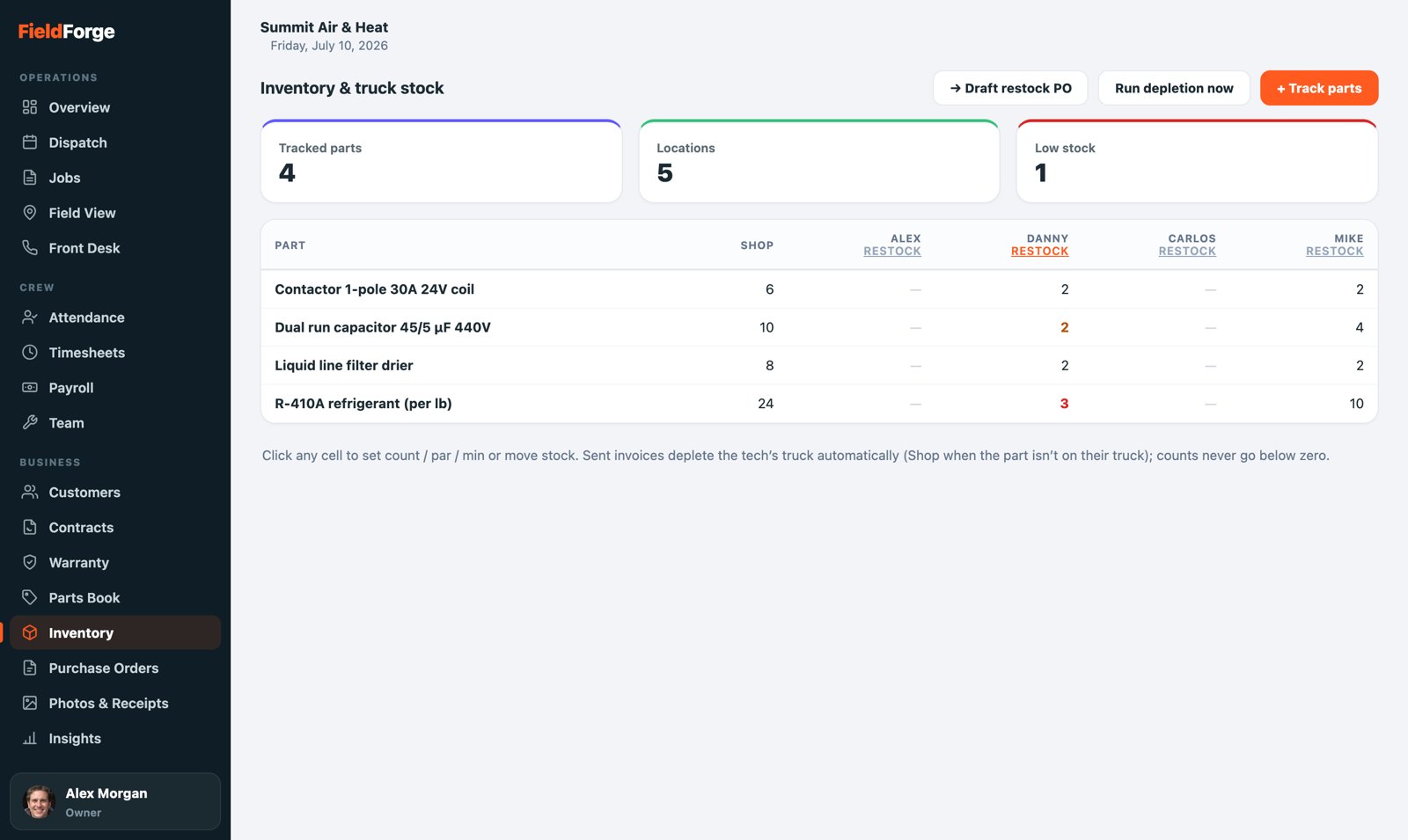
Truck stock & inventory
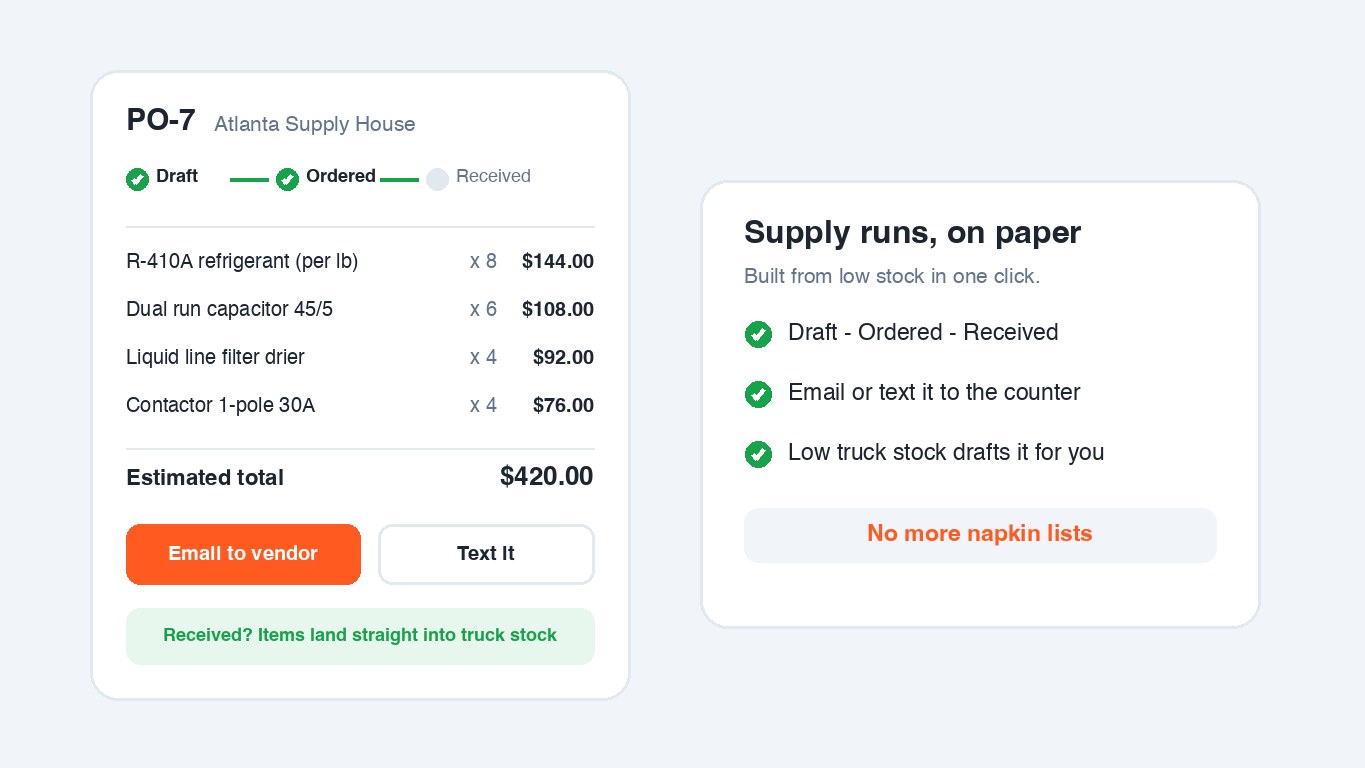
Nobody counts anything: parts on sent invoices come off that tech's truck automatically. You see every truck and the shop in one live matrix with low-stock alerts, techs restock with one tap (“fill to par”), and anything below its minimum becomes a draft purchase order in one click.
How it works: Track the parts you keep on trucks (picked from your price book) → count each truck once → from then on invoices do the math. Received POs land back into stock at the truck you choose.
Crew+
Purchase orders
Issue POs to your supply house, track Draft → Ordered → Received, and email or text them to the vendor's counter. Low truck stock drafts the PO for you with quantities filled to par and costs from your price book.
How it works: Inventory → Draft restock PO (or build one by hand) → send to the vendor → mark Received and the items flow into stock.
All plans
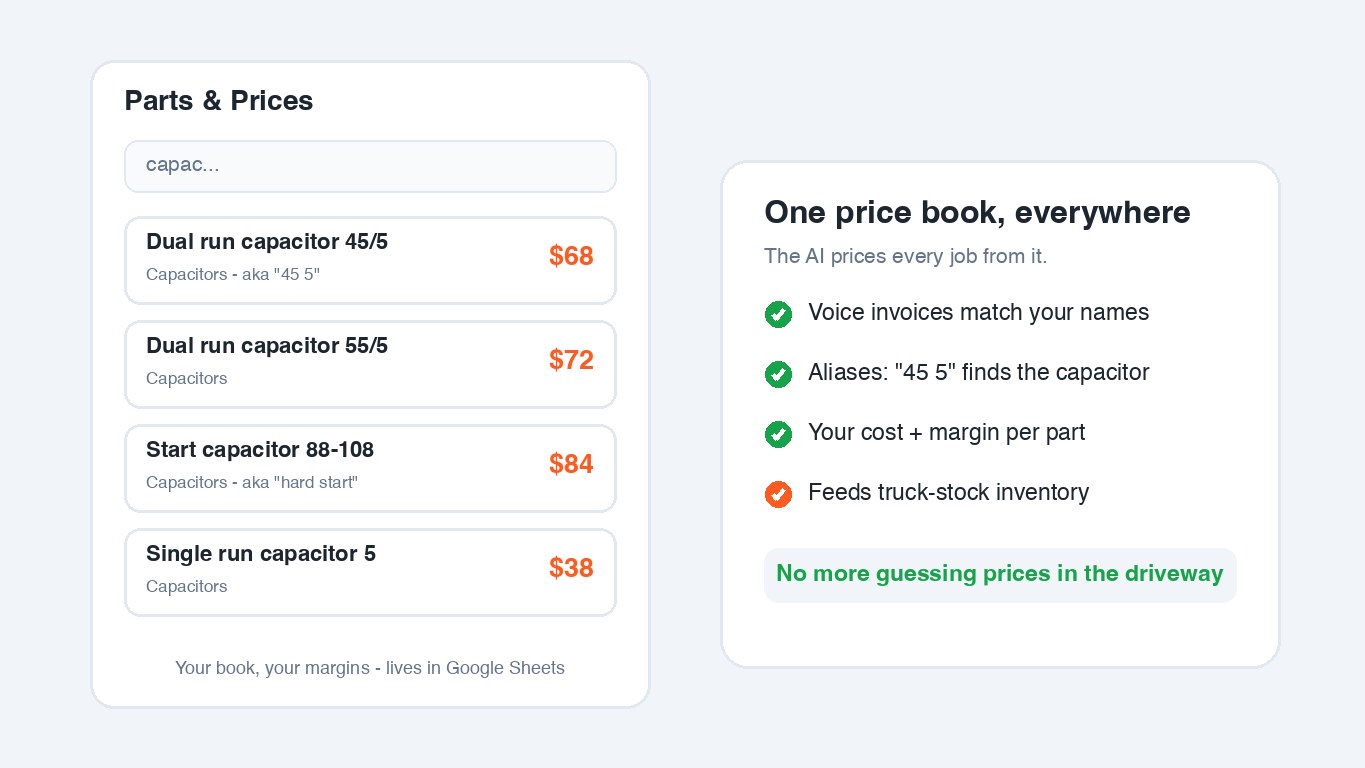
Parts price book
Your catalog with your prices, your cost and your margins — including Spanish names and aliases so the voice AI matches “45 5” to the right capacitor. It lives in a simple Google Sheet you can edit anywhere, and it feeds voice invoicing, inventory and PO costs.
How it works: Start from a trade-specific template (HVAC, plumbing, electrical, appliance, garage door, pool & spa) → adjust prices → every invoice prices itself from it.
Basic all plans · full Trio+
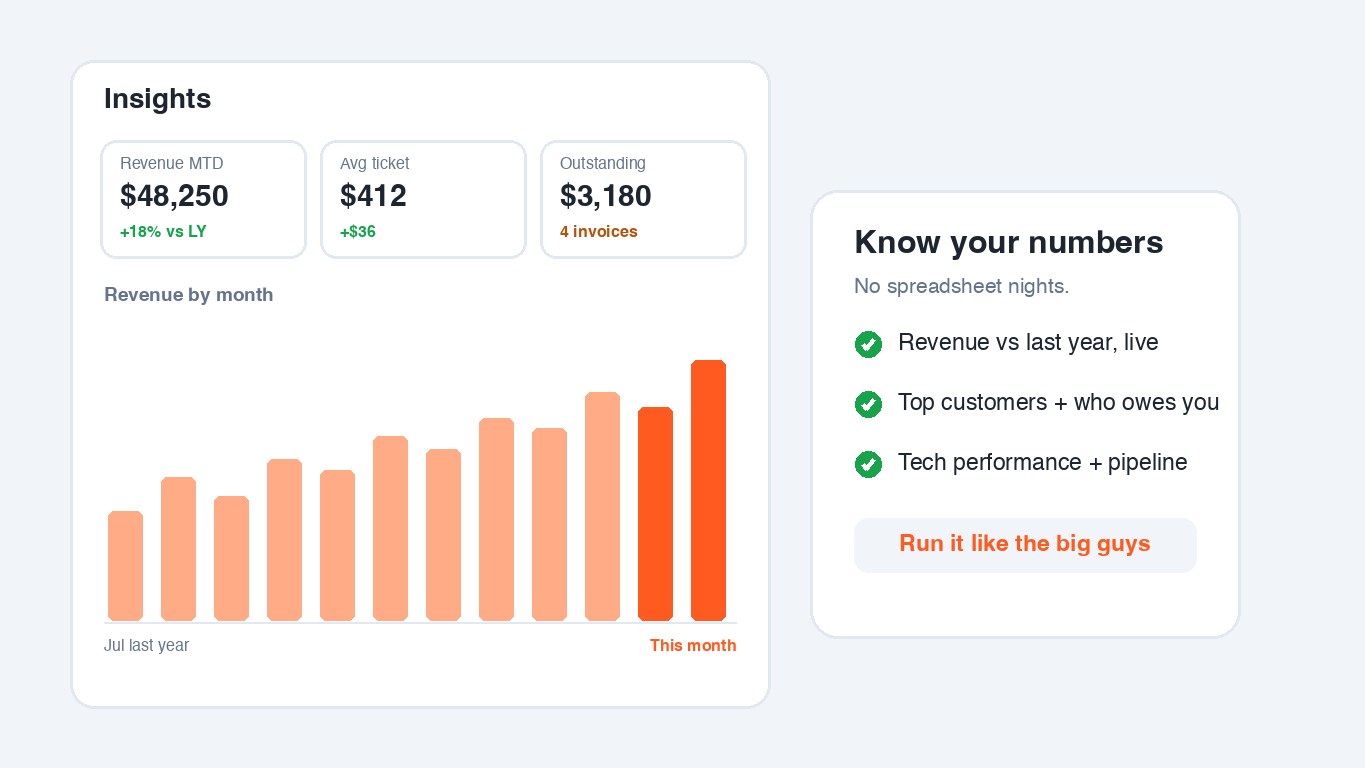
Business insights & reporting
Revenue against last year, average ticket, who owes you, top customers, repeat-customer rate and new customers this year, tech performance, the estimate pipeline and deposits in hand, live, not at month-end. Break revenue down by service type, lead source or location, run any custom date range, export the whole report to CSV, and hide the cards you don't use.
How it works: Open Insights. Leave it on this month or pick any date range, then tap Export CSV when you need the numbers in a spreadsheet.
Per-job profit
Trio+
Every job in the Command Center shows a profit card: revenue minus materials minus labor, with the margin percent. Materials use real receipt totals when the crew snapped them (catalog cost estimates otherwise), labor uses your cost per hour, and unpaid jobs show it as projected. Know which jobs make money before you quote the next one like it.
Activity feed & audit log
All plans (audit owner/admin)
Every job, payment, schedule change and settings edit shows in a live activity feed — plus a permanent, unchangeable audit trail (who did what, when) for the moments you need receipts.
Security & sign-in
All plans
Passwordless sign-in by text or email code, optional two-factor authentication with any authenticator app (backup codes included), and role-based access so techs see their work and owners see everything.